
The eleven sections
One rail, eleven sections, 53 checks. Every number on screen is read from a single analysis rather than recomputed per section, so the panel and the report on turksem.com cannot drift apart. A check that could not be measured draws an honest gap, never a zero.
Summary
The opening section, covered end to end on the previous page. At the top sit the identity card, the indexability verdict, the score with its bands and the category grid. Under them come the findings worth reading first, the page identity measures in characters and in pixels, and the search result preview. At the bottom sit the E-E-A-T scorecard, the accordion holding all 53 checks and the AI report card.
Headings
Counters for H1 through H6, the verdict on the H1, and hierarchy skips such as an h2 followed straight by an h4. Then how much of the title text also appears in the H1, and the outline in document order with indentation. On a page with more than 40 headings the list stops and says how many it is showing.
Links
Internal, external and unique counts, the rel breakdown (dofollow, nofollow, sponsored, ugc, no rel attribute, missing noopener), the domains this page links to most, and the number of links whose text says nothing. Two expandable lists carry the links themselves; past 50 internal links the list is cut and a note says so.
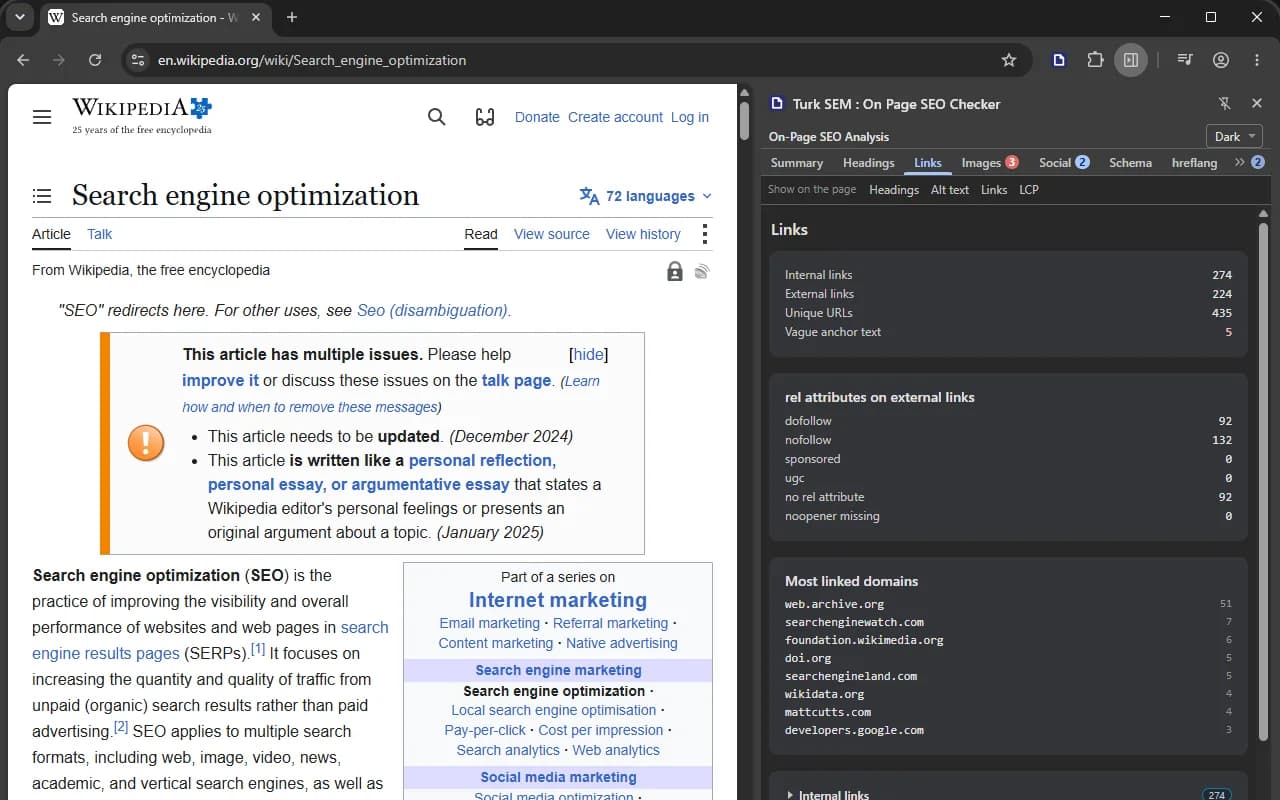
What this section cannot say is whether any of those links resolve. No address that appears on the page is ever fetched, so a link to a page that answers 404 counts exactly like one that works.
Images
The counters cover every image on the page. The findings list under them carries at most 12 samples and the note says so, because the analyzer keeps samples rather than a full inventory. An image with no alt attribute is highlighted, and the count of images that could be served better sits beside it.
Social
The Open Graph table, the card type declared for X, and two previews. The share image is not downloaded: its address sits inside the frame as text. Fetching an image from a remote server would break the promise that nothing leaves your browser except the four requests to the analyzed site itself. A relative og:image path raises its own warning row.
One limit is stated on screen. The analyzer carries og:title, og:image and og:type plus the list of missing tags, not the text of og:description, og:url and og:site_name. So the description line of the preview only fills when og:description is missing altogether, which is exactly the case where platforms really do fall back to the meta description.
Schema
Block and type counts, the rich result groups, the entity graph, the values that actually reach a search result, and the raw JSON-LD blocks at the bottom. The raw blocks are read from the captured HTML rather than from the analysis, so what you expand is the page's own markup. Long blocks are trimmed and the trimming is stated. A block that cannot be parsed is counted and highlighted.
hreflang
The html lang attribute, og:locale, Content-Language, the table of tags, and the verdicts on the self reference and on x-default. On a single-language site the section says there are no hreflang tags and notes that this is normal rather than a fault.
Reciprocity is out of reach here. Only the codes on this page and its self reference were read; whether each alternate answers and points back needs the other pages, and this extension reads one page.
Content
Word count, the text to HTML ratio measured on the rendered DOM, readability metrics whose note says the formulas are calibrated for English, the keyword density table and the dates found on the page. Density is reported without an instruction attached, because on a page about one subject the dominant word is the subject.
Speed
Measured in your own tab by the browser's own APIs. No measuring service is called and no request leaves for one. Each metric gets its own card with the number large in its band color and the band's word underneath.
| Metric | Where it comes from | What it cannot say |
|---|---|---|
| LCP | The browser's largest-contentful-paint entries, last one taken. | It is this session's paint on this device, not what visitors experience. |
| CLS | Layout shift entries with recent input excluded, added up. | Simplified. The published metric takes the busiest five second window; this one adds the whole session, so it comes out greater than or equal to the real figure. That sentence is on the card, not in a footnote. |
| INP | Event entries over 40 ms, grouped by interaction, high percentile. | Until you click something there is nothing to measure, and the row says so instead of showing a zero. |
| FCP and TTFB | The paint entry and the navigation entry. | They belong to this load. Reload the page and they change. |
| Sizes, milestones, protocol | The navigation entry. | The response status is read where the browser reports it and left empty where it does not, rather than claiming a 200. |
The band colors are the public Core Web Vitals thresholds, not a scale of our own: 2500 and 4000 ms for LCP, 0.1 and 0.25 for CLS, 200 and 500 ms for INP, 1800 and 3000 ms for FCP, 800 and 1800 ms for TTFB. The tab badge counts only the metrics in the poor band, because the middle band means worth improving and a red number would report it as broken. The measurement window is written out on screen, and past two minutes a sentence says the numbers belong to an old load.
Robots / AI
This section and the next one wait for the analyzed site's own server. Four requests go out, all of them to that site and nowhere else: /robots.txt, /llms.txt, a HEAD on the page address and a GET on the page address.
From robots.txt the section reads whether Googlebot is open on this exact path, how many Disallow lines the file carries, any Crawl-delay, the Sitemap lines, and the state of eight AI crawlers one by one: GPTBot, ClaudeBot, Google-Extended, PerplexityBot, CCBot, Bytespider, Applebot-Extended and meta-externalagent. Blocking any of them is a legitimate choice, so the table reports the state and stays out of it. Only a Googlebot block earns a red number on the rail.
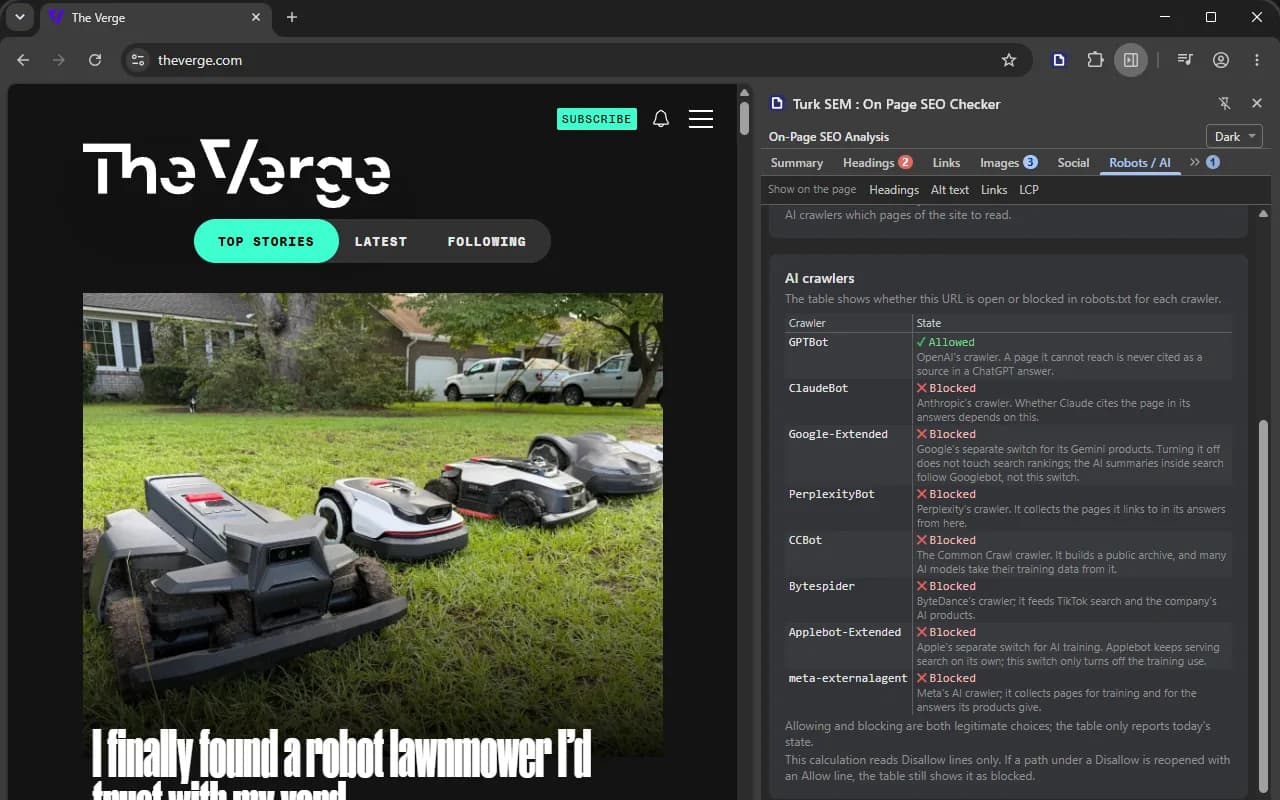
llms.txt gets its own card: whether the file exists, how large it is and the headings it declares. A missing llms.txt is not a fault and earns no red badge, since the file is not even a standard.
One deliberate limit
The robots.txt reader takes Disallow lines into account and ignores Allow lines. It over-obeys, which is the safe direction for a crawler of our own. A path that a Disallow closes and an Allow reopens therefore shows as blocked, and the section says so in two places rather than letting you find out later.
Render diff
The HTML the server sent against the DOM your browser built after running JavaScript, compared on five signals: the title, the canonical, meta robots, the H1 sequence and the hreflang set. Both sides go through the same parser and the same derivation, so you are looking at two readings by one engine rather than at the disagreement of two different ones.
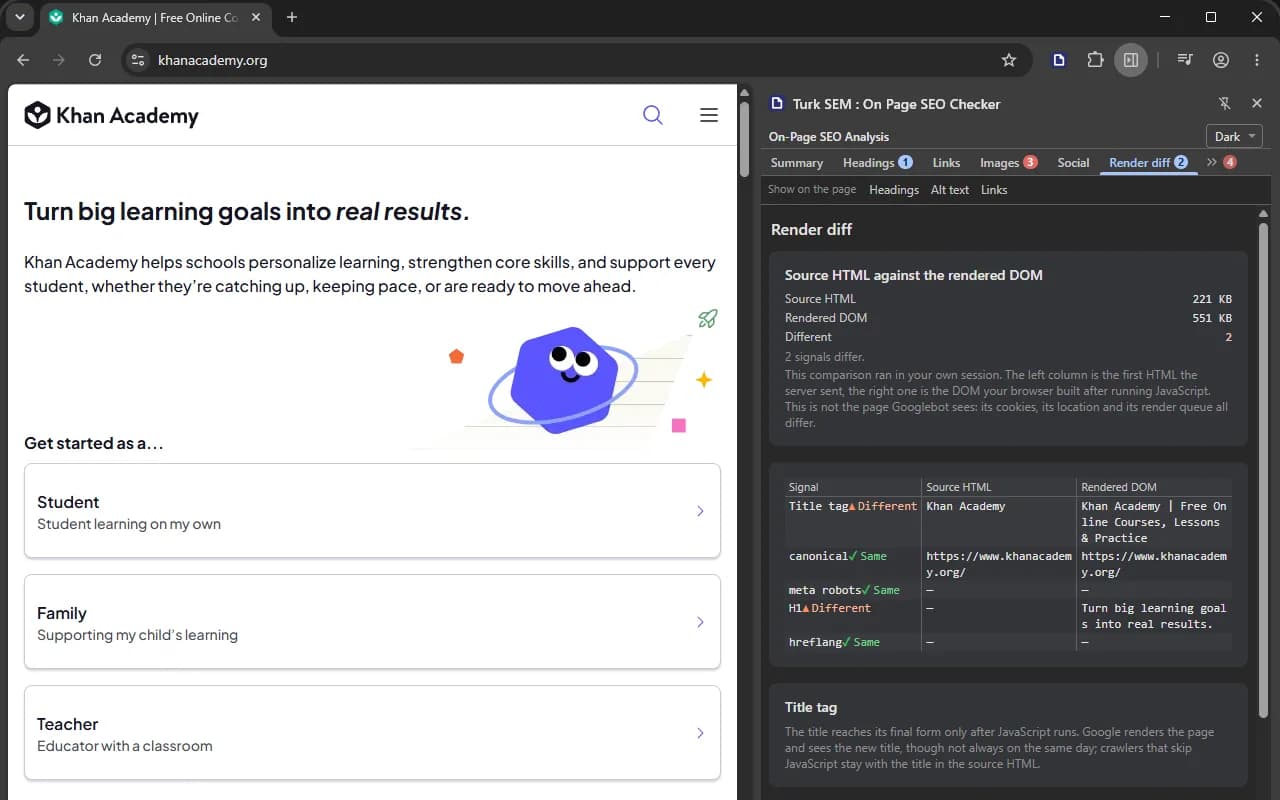
The warning under the card stays on screen in all three languages, and it is the important part: this is not what Googlebot sees. The source request left in your session, with your cookies, from your location. Googlebot has no cookies, comes from another country and has a render queue of its own.
If the source request was redirected to a different address, no comparison is made at all. The two sides would not be the same document, and reporting that nothing differs would be wrong.
Where the numbers come from
The panel carries the same analysis engine that runs the SEO report on turksem.com, compiled into the extension: 53 checks with the same keys and the same thresholds. Nothing is recomputed on screen. Every number is read from one analysis, and a value that could not be read comes back empty so the section can draw a gap.
That analysis runs twice on a page and no more. The first pass fills eight sections immediately. Once all four probes have settled, the response headers and the robots.txt body widen the input and the analysis is refreshed once. Refreshing after each probe would mean reading a large page four times over for no gain.