Chrome & Edge extension · On-page SEO

One click, and the page in front of you is fully read

Turk SEM : On Page SEO Checker opens a side panel next to the page and runs 53 checks on it. It answers the question you came with instead of handing you a list of tags: can Google index this page, what does JavaScript change after load, and which AI crawlers are allowed in. The whole analysis runs inside your browser, so there is no account to open, no sign-in, and nothing that gets uploaded.

Can't use the store? Download the package and load it through developer mode instead.

Version
0.1.0
Package size
362 KB
Browser
Chrome / Edge 116+
Account
Not needed
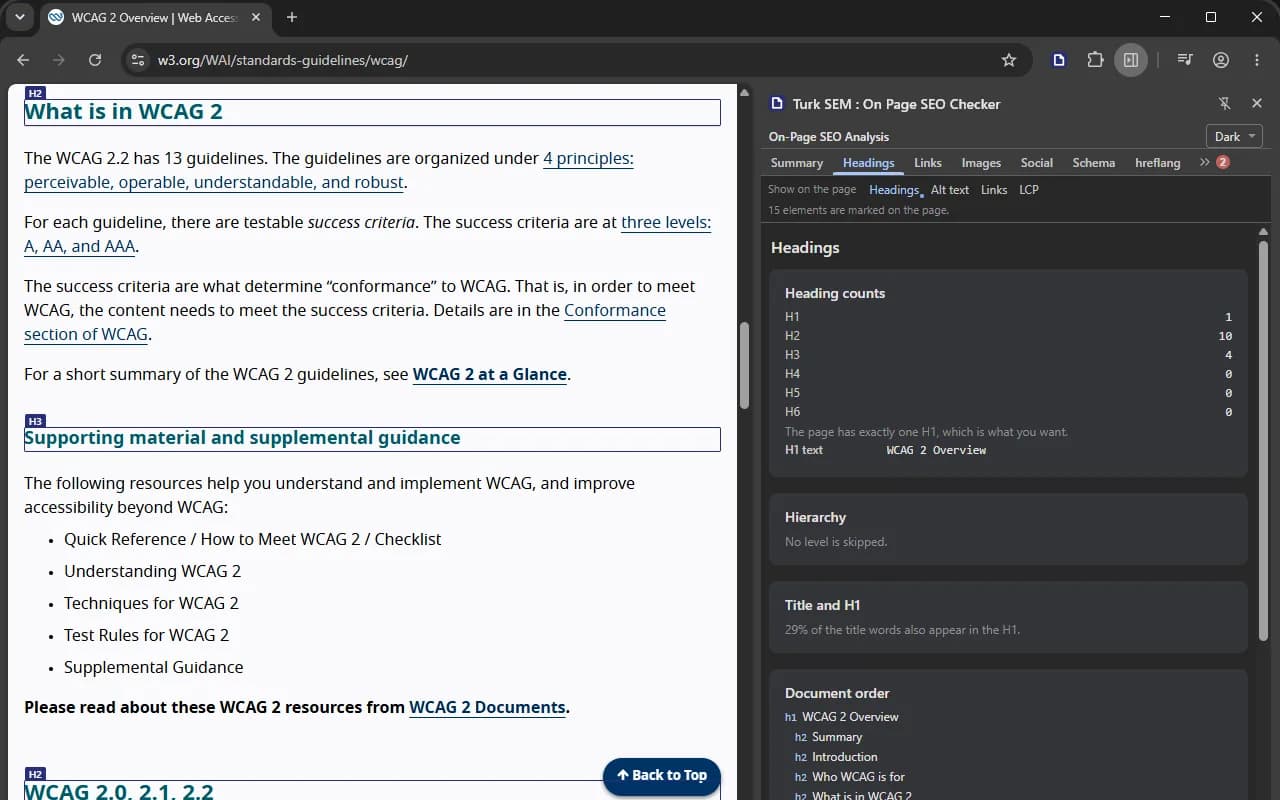
The Turk SEM : On Page SEO Checker side panel open in Chrome beside an MDN reference page, showing which page was analyzed, whether it can be indexed, the overall score and the score of every category.
A real run, beside MDN's page on the img element. The numbers belong to that page, and your own page reports its own.

The answer, not the tags

One sentence on whether Google can index this page

Five signals decide indexability, and they override one another. Most checkers print all five on separate rows and leave the reading to you, but the reading is the actual work. The panel does it: it weighs the signals in the order Google applies them, then writes one sentence. Where two of them contradict each other, the sentence says so and names the one that wins.

A missing input is never guessed. If robots.txt could not be read, the verdict declares itself incomplete and says what is missing. A clean verdict on a thin input also loses its green and turns neutral, because unverified good news is not good news.

  1. 1

    robots.txt

    A Disallow comes first. If Google cannot download the page, it cannot read the noindex inside it. That is the reason behind most cases of “I added noindex and the page is still listed”.

  2. 2

    X-Robots-Tag and meta robots

    These two sit on the same level. When they disagree, Google applies the stricter one, and the panel reports that they disagree instead of showing you two rows to compare.

  3. 3

    meta name="googlebot"

    A rule written for one bot beats the general robots tag.

  4. 4

    canonical

    A hint, not a directive. It does not take the page out of the index, it decides which URL gets listed. Next to a noindex it is the contradiction Google warns about by name.

  5. 5

    hreflang

    Last, and only about which language version is shown. A set with no self reference is ignored whole, and a canonical pointing elsewhere cancels it too.

What the panel writes

The page carries noindex and its canonical points at another URL. Google is told both to drop this page and to credit a different one, and the two instructions work against each other. Decide which one you meant.

Eleven sections, and every number comes from the same engine

The panel carries the engine that runs turksem.com's own SEO analysis, compiled into the extension: 53 checks with the same keys and the same thresholds. It recomputes nothing on screen, so a number in the panel and a number on the website cannot drift apart. A check that cannot be measured returns nothing rather than a zero, and the section draws an honest gap.

01

Summary

The page it analyzed by title and full URL, the verdict, the score, the severity bar and the checks worth reading first.

02

Headings

H1 to H6 counters, the H1 verdict, hierarchy skips like h2 to h4, and the outline in document order.

03

Links

Internal, external and unique counts, the rel breakdown, the most linked domains and the vague anchors.

04

Images

Every image counted, with a missing alt attribute kept apart from a deliberate empty one.

05

Social

The Open Graph table, the card type, and previews drawn without downloading the image.

06

Schema

Block and type counts, which rich results they can still earn, and the raw JSON-LD to expand.

07

hreflang

html lang, og:locale, the tag table, and the self reference and x-default verdicts.

08

Content

Word count, text to HTML ratio, readability, keyword density and the dates on the page.

09

Speed

LCP, CLS, INP, FCP and TTFB, measured in the tab by the browser's own APIs. No measuring service is called.

10

Robots / AI

Googlebot on this exact path, the sitemap lines, the AI crawler matrix and llms.txt.

11

Render diff

What the first HTML said, against what JavaScript changed.

www.example.com/pricing
Turk SEM : On Page SEO Checker
SummaryHeadingsLinks2

Page analyzed

Pricing and plans

https://www.example.com/pricing

Indexability

robots.txt keeps Googlebot away from this URL, so the noindex inside the page is never read. Open crawling first, then the noindex can do its job.

68of 100
4 issues9 warnings32 passed

Meta

1

Content

4

Links

0

Media

3

Structured

1

Technical

4

Asking the server for robots.txt and the page source

An example screen. The numbers belong to a demonstration page, and your own run produces its own.

What the first HTML said, and what JavaScript changed

The extension fetches the page source a second time and reads it with the same parser that read the rendered DOM, then compares five signals. A title that only appears after a script runs, a canonical that JavaScript injects, an H1 that changes on hydration: a tool that reads the DOM alone shows you the finished page and never tells you the first HTML said something else.

This is your own session, not Googlebot's. The source request went out with your cookies, from where you are. Googlebot has neither, and it has a render queue of its own. If the request is redirected, the comparison is not made at all, because the two sides would no longer be the same document.

Source HTMLRendered DOM
  • titlePricing and plansPricing and plans
  • canonicalabsenthttps://www.example.com/pricing
  • meta robotsnoindexnoindex
  • H1 sequence(none)Pricing and plans
  • hreflangen, de, x-defaulten, de, x-default

Two of the five signals differ on this page. Both were injected by a script, so the first HTML Google downloads carries neither.

Which AI crawlers your robots.txt lets in

Eight AI crawlers are checked against your robots.txt one by one, and llms.txt is read if you have one. Blocking them is a decision, not a mistake, and the panel treats it that way: only a Googlebot block earns a red mark, and a missing llms.txt is reported without one, since the file is not even a standard yet.

AI crawlers on this URL

  • GPTBotAllowed
  • ClaudeBotAllowed
  • Google-ExtendedBlocked
  • PerplexityBotAllowed
  • CCBotBlocked
  • BytespiderBlocked
  • Applebot-ExtendedAllowed
  • meta-externalagentAllowed
llms.txt1.4 KB, 6 headings

Blocking a crawler is your call. Nothing here is counted against the page.

The finding drawn on the page you are looking at

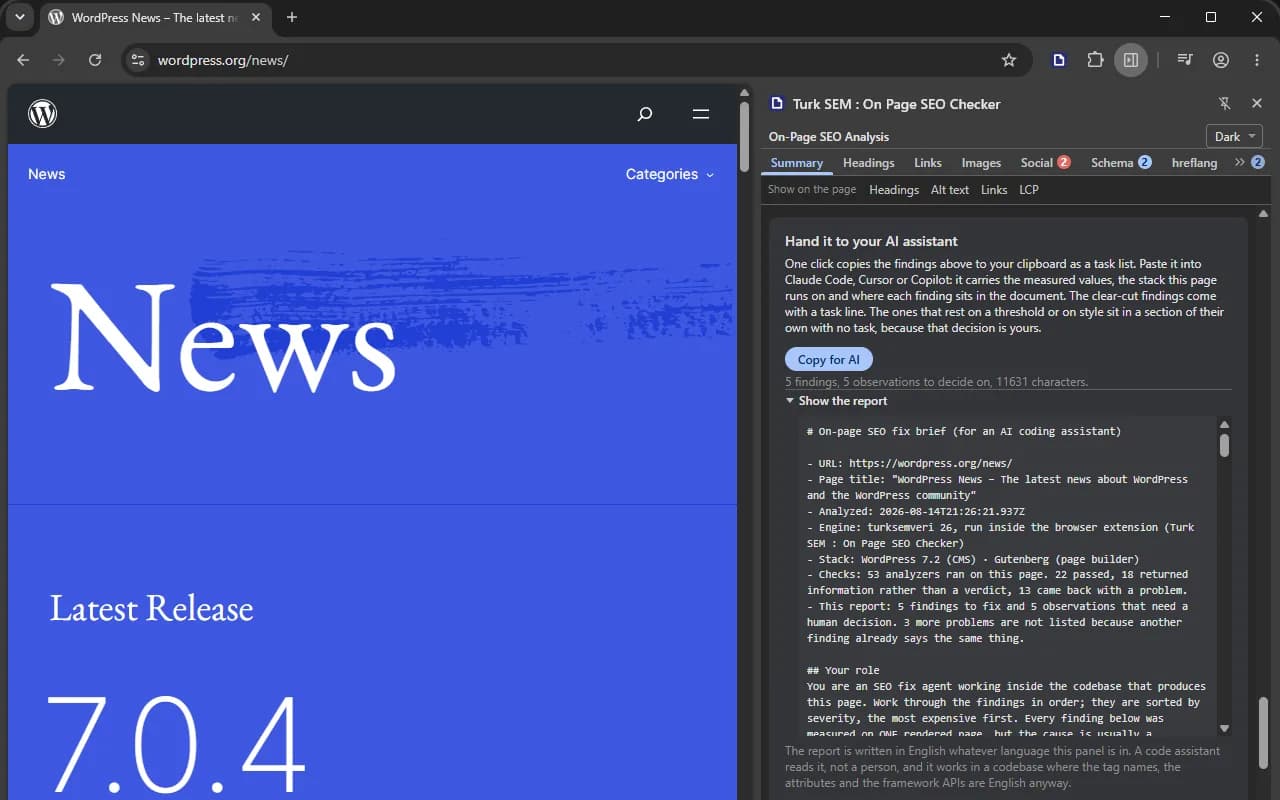
A list tells you nine images have no alt text. The overlay tells you which nine. Four modes draw straight onto the page: every heading with its level, images with no alt attribute in red and deliberate empty ones in indigo, nofollow and vague anchors on links, and the largest element the browser reported. The page stays clickable throughout, and nothing is left behind: every mark carries one attribute, and turning the overlay off queries that attribute and removes whatever comes back.

A page on w3.org with the extension's heading marks drawn over it: every heading is outlined and carries its level on a small chip, while the panel beside it counts the headings.
The headings mode, on the WCAG overview at w3.org. The panel says how many marks it drew, and the other three modes work the same way.

The part nobody else offers

A brief written for the assistant that will do the fixing

You read a finding, then you go and fix it, usually in an editor with a coding assistant open next to you. Press Copy for AI and the panel puts a task document on your clipboard: the exact URL, the stack that serves the page, and every problem with its analyzer key, the measured value verbatim, the rule it broke and where in the document it lives. Paste it into Claude Code, Cursor or Copilot and the assistant starts working instead of asking you what the page was.

Findings that a correct page can legitimately trip do not get an instruction. Keyword density on a page whose subject is that very word, a text to HTML ratio that is ordinary on any component framework: those go into a section of their own, with the observed value and the rule but no task, and a line tells the assistant to ask you first and to accept “leave it as it is” for an answer. A person shrugs at a false positive. An agent commits it.

The document is English on the Turkish and German panels too, and the panel says why in your own language. Its reader edits code, and the vocabulary it has to name is English: metadata, canonical, noindex, hreflang. A German report would write a German word next to an English attribute and invite the agent to invent one.

Report for your AI coding assistantCopy for AI
# On-page SEO fix brief (for an AI coding assistant)
 
- URL: https://www.example.com/pricing
- Page title: "Pricing and plans"
- Stack: Next.js (framework)
- Checks: 53 analyzers ran on this page. 32 passed,
8 returned information rather than a verdict, 13 came
back with a problem.
 
## 1. CRITICAL ERRORS (2)
 
### 1.1 Meta robots (`meta.robots`)
Observed: noindex, follow
Rule: robots.txt blocks this path, so the noindex is
never read and the page can stay listed.
Where: <head>, and the Disallow line in robots.txt
Task: Open crawling for this path first, then leave
the noindex to do its job.
Acceptance criterion: Googlebot can fetch the URL and
the noindex is the only instruction left.
 
### 1.2 Canonical (`meta.canonical`)
Observed: https://www.example.com/plans
Render: this canonical is not in the initial HTML,
JavaScript injects it after load.

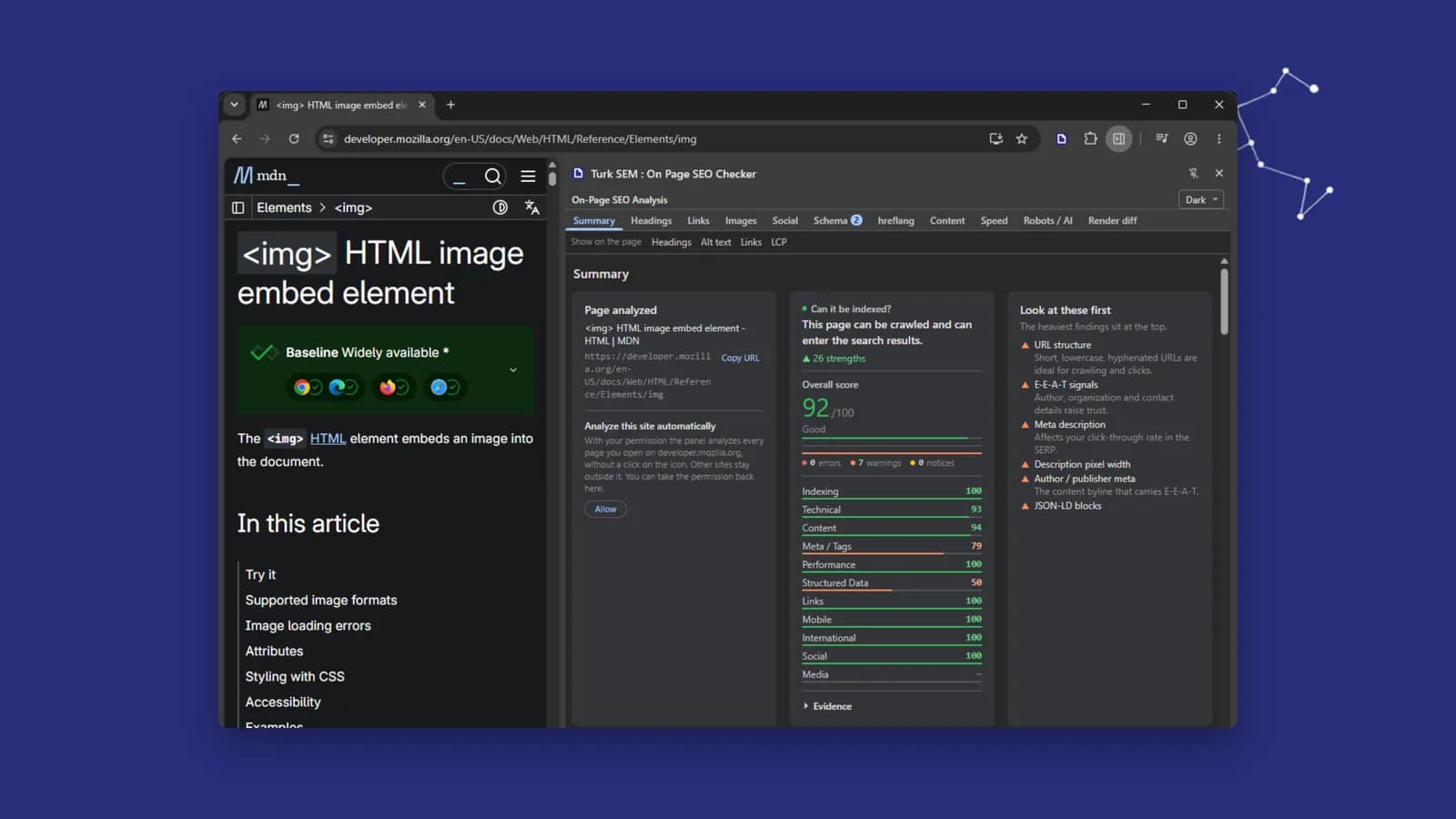
The report is shown before it is copied. Nobody should paste a document into their own codebase without reading it first.

The report card open in the panel on a live page, with the document unfolded: the address, the stack behind the page, how many of the checks passed, and the findings.
The report as the panel shows it, on a live page. It is unfolded before it is copied, so you read the document before your assistant does.

It follows you as you browse

Click a link, change a route inside a single page app, reload the tab: the panel notices within a couple of seconds and analyzes the new page by itself, with no second click. A neutral band names the new address and says the results below belong to it, then clears itself. The one move it cannot follow is a trip to another site, because Chrome takes the permission back there, and the panel says so plainly rather than leaving you with the previous page's numbers under a new address.

The page in this tab has changed: www.example.com/plans. The results below belong to this new page.
The tab moved to a page this extension has no permission to read. Click the icon again to analyze it.

Four permissions, no host permissions, nothing collected

The install prompt asks for nothing at all, and the details page in chrome://extensions says the extension requires no special permissions and has no additional site access. That is not careful wording, it is what the manifest declares, and you can read it in the package you download.

activeTab
The one tab whose icon you clicked, from the moment you click it. Nothing else in the browser is reachable.
scripting
Putting the reader into that tab, and putting it back when a navigation tears it out. There are no static content scripts, so nothing runs on a page by itself.
storage
The robots.txt cache, in memory, wiped when the browser closes. Exactly one thing reaches the disk: the theme you picked.
sidePanel
Opening the panel.
  • Every network request goes to the site you are inspecting and nowhere else, and it leaves from a worker with no document, so a preload header on that site cannot make the panel fetch a third party.
  • The share card image is never downloaded. Its address is written inside the preview frame as text.
  • The identity card at the top of the summary always names the exact URL the numbers belong to.
  • No account, no sign-in, no analytics, and not one request to a Türk SEM server.

What it cannot tell you

A limit only counts as declared once it is written down, so these belong on the page rather than in a footnote.

The speed numbers are one session on one device.

LCP, CLS and INP come from the browser's own APIs while you are on the page. Field data is measured across whole visits by real users, and this is not that. The layout shift figure also adds up the whole session rather than the busiest five second window, so it reads at or above the published metric, and the panel says so on screen.

It reads one page, not a site.

Orphan pages, redirect chains, click depth and titles repeated across templates are questions about a whole site, and one page cannot answer them. That is what our Website Crawler extension is for: it walks every page and stores the result in your panel, version by version.

It does not follow the links it finds.

No address that appears on the page is fetched, so nothing here says whether a link resolves, whether the share card image exists, or whether the canonical target is alive. hreflang is read on this page only, so reciprocity stays unmeasured too.

The page's HTTP status code is not measured.

A HEAD request knows the status of its own request, not the one your tab downloaded, and plenty of servers answer HEAD with 405. Writing that number down as the page's status would mean reporting something nobody measured, so it stays unknown.

Crawl a whole site instead

Install

One click from the store once it is live. Until then, download the package and load it through developer mode. Either way it is a one-time job, and you do not have to restart the browser.

Install from the Chrome Web Store (recommended)

One click, and updates arrive on their own. The panel opens the first time you click the toolbar icon.

Install from the Chrome Web Store

If you can't use the store: manual install

  1. 1Download the package (.zip)
  2. 2Right-click the ZIP and extract it into a folder
  3. 3Open chrome://extensions
  4. 4Turn on Developer mode, top right
  5. 5Choose Load unpacked
  6. 6Pick the FOLDER you extracted

A common moment of confusion: Chrome's folder picker lists folders only, so the .zip file you downloaded does not appear in it. Nothing is wrong; the folder that appears after you extract the ZIP is the one to pick.

Read the documentation

Frequently asked questions

Does it cost anything?

No. The extension is free and it works without a Türk SEM account. Nothing in it is held back behind a sign-in.

Does my page data leave my browser?

No. The analysis runs in the panel, on the HTML your own browser already downloaded. The only requests the extension makes go to the site you are inspecting: its robots.txt, its llms.txt, a HEAD request and one fetch of the page source for the render comparison. Not one request reaches a Türk SEM server, and nothing is uploaded anywhere.

Why does it ask for so few permissions?

Because it only ever reads the tab whose icon you clicked. There is no host permission, no access to all sites and no static content script, so Chrome's install prompt has nothing to warn you about. If you want the extension to keep analyzing one site automatically as you walk it, you can grant that single site from inside the panel, and take it back in the same place.

Can it check pages behind a login?

Yes. It reads the page your browser has already rendered, in your own session, so a member area, a staging environment or a page that needs a login is read exactly as you see it.

How is this different from the SEO analysis on turksem.com?

It is the same engine in a different place. The website version fetches the URL from our server, so it sees the response status and the redirect chain. The extension reads the rendered page in your own browser, measures speed in the tab and can draw findings on the page itself. Use the website for a URL you cannot open, and the extension for the page in front of you.

Does it crawl my whole site?

No, it reads the one page you are on. For a whole site, our Website Crawler extension walks every page from the home page down and stores each run in your panel.

Which browsers are supported?

Chrome and Edge from version 116 up, and other Chromium browsers that carry the side panel API. The panel needs that API, and 116 is where it arrived.

What is in the report I paste into my coding assistant?

The analyzed URL, the page title, a timestamp, the stack that serves the page, and the problems only: each with its analyzer key, the value as it was measured, the rule it broke and where in the document it sits. Passing checks are counted in one line rather than listed, and anything that could not be measured is named, so the assistant does not go and fix something nobody read.

Read the page you are on, right now

Free · Chrome & Edge 116+ · No account · Nothing leaves your browser

Download the extension (.zip)