Browser extensions · Chrome and Edge

Chrome extensions for SEO: which one is for you?

Every extension here runs inside your own browser.

What separates them is how much they read, what they need from you and where the answer shows up. The cards below put the same questions to each one in the same order, so you can pick before you install anything.

Which one do you need?

The same questions, answered for each extension.

One page

On Page SEO Checker

Reads the page you have open inside your own browser and answers in a side panel. It needs no account and sends the page nowhere.

What it reads
The single page open in front of you, read straight out of the tab. 53 checks run, and the page is read after JavaScript has done its work.
What it needs from you
Nothing. No account, no sign-in, and no page content leaves your browser.
Where the result appears
In a side panel beside the page, within seconds.
What it asks the browser for
Four permissions. It reads nothing until you click the icon on the page you want checked.
What it costs
Free.

The whole site

Website Crawler

Walks every page of your site from your own browser and files each run in your Türk SEM panel as a version.

What it reads
Every page of your site. It starts at the home page, follows internal links and walks up to 10,000 pages in one run.
What it needs from you
A free Türk SEM account and a site you have verified in Search Console.
Where the result appears
In your Türk SEM panel. Every run is filed as a version and compared with the one before.
What it asks the browser for
Access to every site, because a crawl has to open pages you never opened yourself.
What it costs
Free, and the Türk SEM account is free as well.

What each one is good at

The short version. The long one is on each extension's own page.

One page

Turk SEM : On Page SEO Checker

Reads the page you have open inside your own browser and answers in a side panel. It needs no account and sends the page nowhere.

One sentence on indexability
Five signals decide whether a page can be indexed, and they override one another. The panel weighs them in the order Google applies them and writes the answer as a sentence, instead of leaving you five rows to combine.
Source against rendered
It fetches the HTML your server sent and compares five signals with what the browser ended up with. That is how you see what JavaScript added after load and what it took away.
A report for your coding assistant
One click puts the findings on your clipboard as a task document. Paste it into Claude Code, Cursor or Copilot and the assistant has the problems, the measured values and the stack the page runs on.

Read the documentation

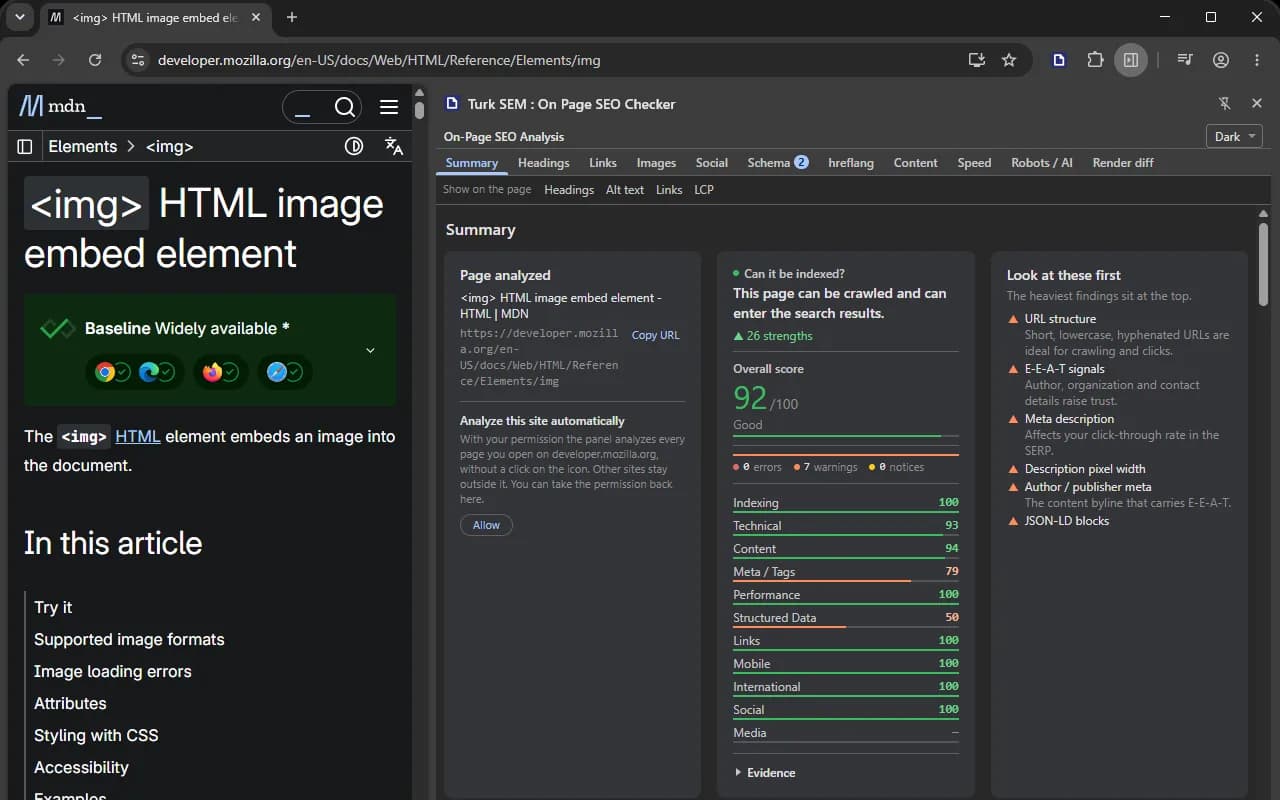
The On Page SEO Checker side panel open in Chrome beside a reference page, showing which page was analyzed, whether it can be indexed, the overall score and the score of every category.
A real run, beside MDN's page on the img element. Those numbers belong to that page, and your own page reports its own.

The whole site

Türk SEM Website Crawler

Walks every page of your site from your own browser and files each run in your Türk SEM panel as a version.

Up to 10,000 pages in one run
It starts at the home page and follows every internal link it finds, the way a search engine spider does. Orphan pages, the ones nothing links to, come out of the same walk.
Real status codes and redirect chains
Requests leave your own browser, not our server. A 404 really is a 404, a chain is counted step by step, and a section behind a login can be crawled with your own session.
Every run is kept as a version
The panel files each crawl and compares it with the one before, so you read the difference instead of lining up two reports yourself.
A drawing, not a screenshot: it shows the route a crawl takes. The crawl itself runs in your browser, and the report lands in your panel.

Before you install

Every extension here needs Chrome or Edge 116 or newer. Safari and Firefox are not supported yet.