
Marks on the page itself
Under the section rail sits a small toggle group. It draws the finding on the page you are looking at, so you can see which heading, which image and which link the panel means. Four modes, one at a time.
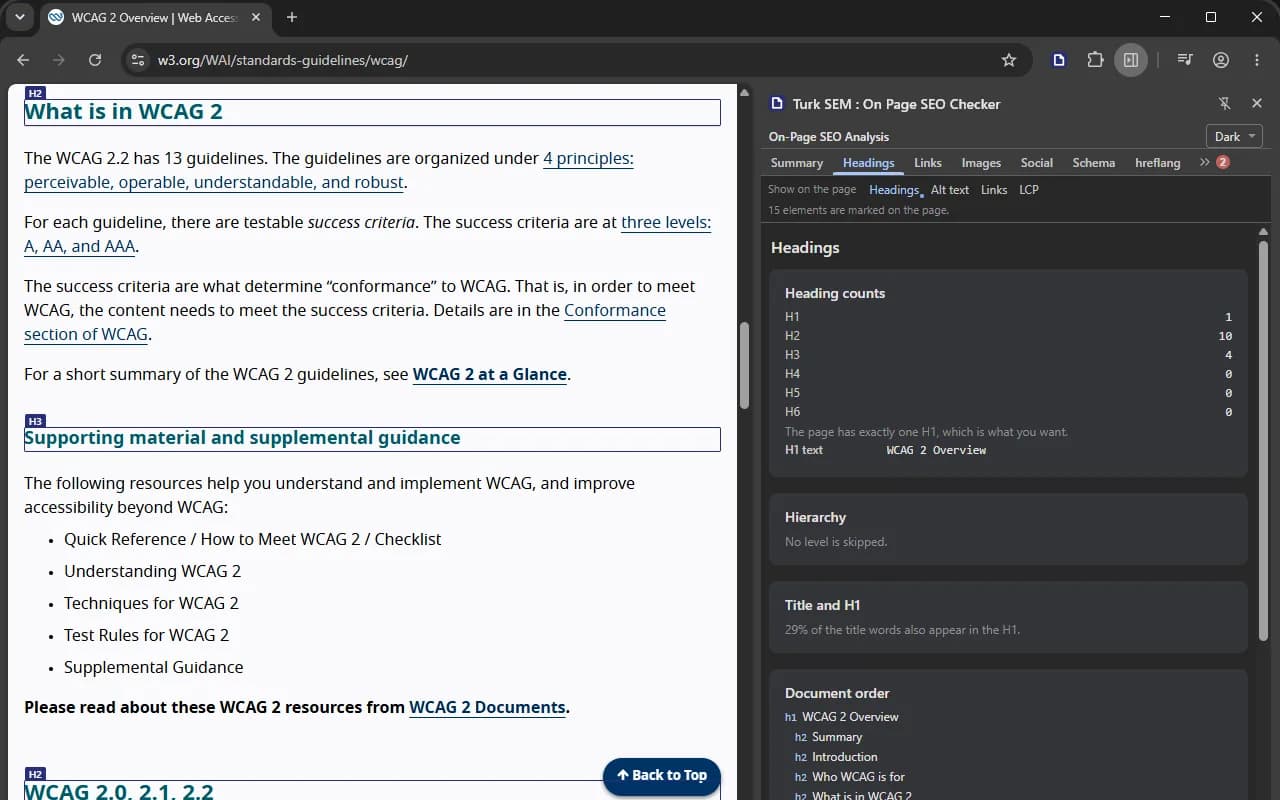
The four modes
| Mode | What it draws |
|---|---|
| Headings | Every heading from H1 to H6 framed, with its level on a chip above the frame, so the document outline becomes visible on the page itself. |
| Alt text | Images with no alt attribute in red, images with an empty alt in indigo. The two are not the same thing: a missing attribute makes a screen reader read the file name out loud, while an empty alt is the correct way to declare a decorative image. |
| Links | The rel words on a chip for nofollow, sponsored and ugc, and an amber frame around any link whose text says nothing. |
| LCP | An outline around the largest element the browser reported. The button only appears when there is such an element. |
One at a time, on purpose
The modes rule each other out. Two sets of boxes over one page cannot be read, so turning one on takes the previous one off in the same instant. Pressing the button that is already lit turns everything off. A line under the group says how many elements were marked, or that nothing on this page needed a mark.
It stays out of your way
- The whole overlay ignores the mouse, so the page underneath stays clickable.
- The boxes carry page coordinates rather than screen coordinates, so scrolling needs no listener at all and every frame stays on its element.
- An element with no area is not drawn. A frame in the top left corner would say the problem is up there, and that would be false.
- At most 400 boxes are drawn at once, and the count on screen says how many.
- The container measures its own position and subtracts it, so the frames still land correctly on a page whose body is positioned or carries a transform.
The list of vague link texts is the panel's own list
The words that earn an amber frame come from the engine's own list, the same one the Links section counts with, so the page and the panel cannot disagree. It speaks all three languages: click here and read more, but also buraya tıklayın, detaylı bilgi, hier klicken and mehr erfahren. The comparison tries the Turkish lower casing as well as the plain one, because Turkish rules turn an upper-cased Latin anchor into something the plain rule would miss.
Turning it off
Press the lit button. The marks also come off by themselves when the page is reloaded or navigated away from, and on the next click of the toolbar icon, which clears the page before it reads it again.
Everything the overlay creates carries one attribute, and nothing else in the document is ever given it: one style element and one container. Removal does not delete the two references the module happens to hold, it runs a query for that attribute and removes whatever comes back. Every answer to an overlay message carries the result of running that query once more, so the claim is checkable rather than merely stated. You can check it yourself in the page's own console:
document.querySelectorAll('[data-tsem-overlay]').lengthIt has to come back 0 once the overlay is off, and it still has to come back 0 after you switch modes four or five times.
Two things it will not do
- Closing the panel does not clear the marks. A side panel gets no reliable unload event, and a message sent while a document is being torn down does not arrive either. Reload the page or click the icon again. Faking it with a timer would be worse than saying it out loud.
- A follow turns the overlay off rather than redrawing it. The boxes belonged to a DOM that has just been replaced, and the elements a mode framed may not exist on the new page. A lit button over nothing is the one state this feature is built never to reach, so press it again on the new page.
When it cannot reach the page
If the page navigated away, or the reader the extension injected is gone, the panel says the page could not be reached and asks you to click the icon again. Its own button drops back at the same moment. There is no silent retry loop, and there is no button that looks on while nothing is drawn.
It works on strict sites too
The styles of an injected reader are not subject to the page's own content security policy, and the overlay builds its elements without writing HTML strings anywhere. Pages that enforce Trusted Types therefore raise nothing in the console either.