
Reading the panel
The panel answers before it lists. This page walks the Summary from the top down: which page the numbers belong to, the verdict in one sentence, the score and its bands, the section rail, and the band that tells you the page underneath has changed.
It names the page it read
The first card in Summary carries the page title and the full address, before anything else. That order is deliberate. The question you came with, can this page be indexed, is unreadable until you know which page is meant. The address is the one captured at the moment of your click, fragment and all.
It is not shortened in the middle, because a shortened address cannot do its one job, which is telling two pages of one site apart. It wraps instead, it stays selectable with the mouse, and there is a copy button beside it.
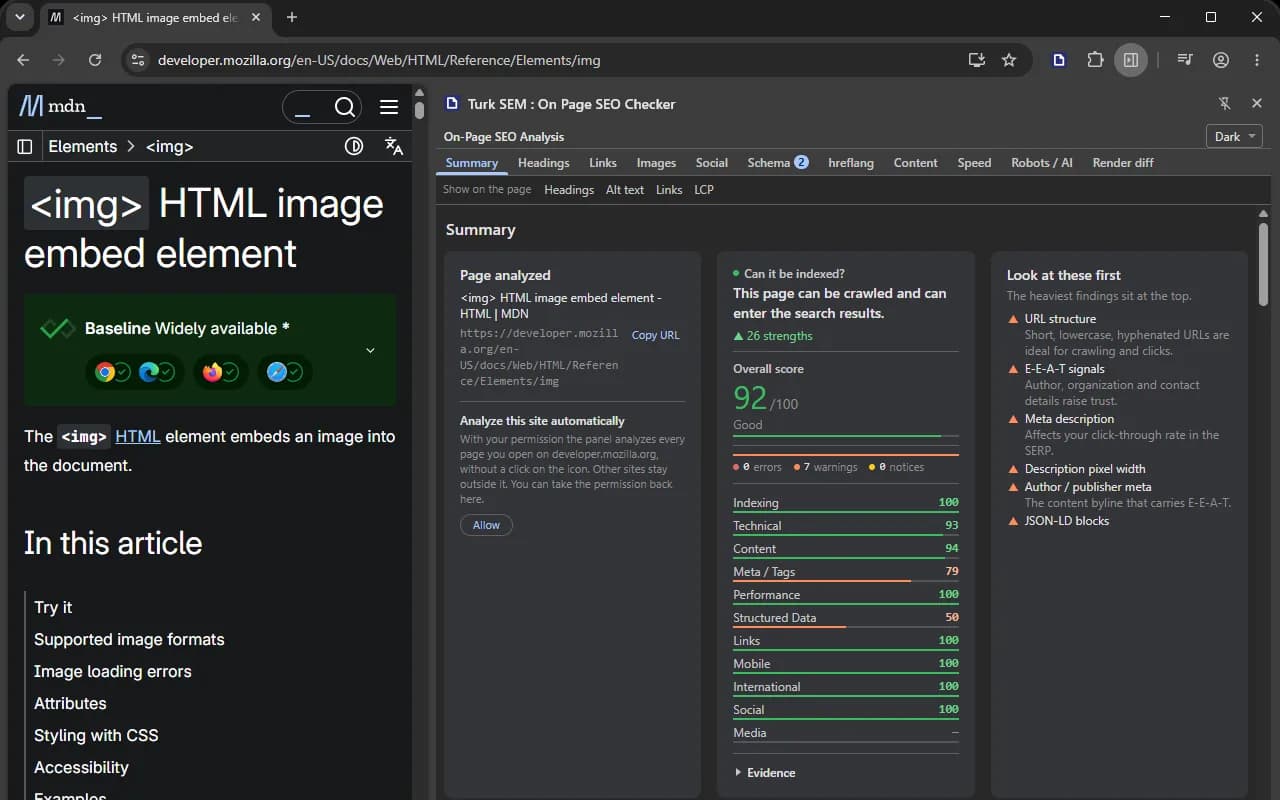
Whatever else happens, this card names the page the numbers on screen belong to. When the panel follows a navigation the card moves with it. While the new page is still being read the card still names the old one, which is correct, because those are still the numbers you are looking at.
The verdict is one sentence
Five signals decide whether a page can be indexed, and they override one another. Most checkers print all five on separate rows and leave the reading to you. The reading is the actual work, so the panel does it and writes one sentence. Where two signals contradict each other, the sentence says so and names the one that wins.
| Signal | What it decides |
|---|---|
| robots.txt | Comes first. If Google cannot download the page, it cannot read the noindex inside it. That is the reason behind most cases of “I added noindex and the page is still listed”. |
| X-Robots-Tag and meta robots | The same level. When they disagree, Google applies the stricter one, and the panel reports the disagreement instead of leaving you two rows to compare. |
| meta name="googlebot" | A rule written for one bot beats the general robots tag. |
| canonical | A hint, not a directive. It does not take the page out of the index, it decides which URL gets listed. Next to a noindex it is the contradiction Google warns about by name. |
| hreflang | Last, and only about which language version is shown. A set with no self reference is ignored whole, and a canonical pointing elsewhere cancels it too. |
A missing input is never invented. If robots.txt could not be read, the panel does not assume the page is open: the verdict declares itself incomplete and names what is missing. A clean verdict on a thin input also loses its green and turns neutral, because unverified good news is not good news.
The score and its bands
Under the verdict sits the overall score out of 100, printed large in its band color with the grade word beneath it. Then the severity bar, which shows errors, warnings and passed checks as widths rather than as a list. Then the category grid, one box per category with its finding count. Pressing a box takes you down to that category's own accordion.
The numbers add up, and that is a rule rather than a happy accident. On a run of 53 analyzers the panel says how many came back with a problem, how many passed and how many returned information rather than a verdict, and the three add to 53. An arithmetic that does not close is a sign that something is being hidden.
Severity, and what the rail badges count
A red number on a section tab counts the checks in that section that came back as an issue or a warning. The severity bar in Summary counts every category, so the badges add up to less than or equal to the bar. The two are not competing measurements of the same thing and they cannot contradict each other.
Eleven sections in a narrow column
The rail lays out as many section names as fit and puts the rest behind a chevron at the right end, the way Chrome DevTools does. Two details matter in use. The selected section is considered first, so it is never the hidden one, and picking a section out of the menu pulls it onto the strip. And the chevron carries the sum of the hidden sections' badges, so a section with problems cannot vanish behind it and take its red number along.
- The arrow keys walk the rail, Home and End jump to the ends.
- Enter, Space or the down arrow opens the chevron menu. The arrows walk it, Enter picks, and Escape closes it and gives focus back.
- Widening the panel brings tabs back out of the menu on its own.
The theme
At the right of the title row there is a combo box with three values: Auto, Light and Dark. The panel opens dark whatever your browser is set to, because dark is what its readers run their developer tools in. Auto still means the browser, it is simply no longer what you get before you have chosen. Your choice survives a restart, and it is the only thing this extension ever writes to disk.
When the page underneath changes
Every two seconds the panel asks the page where it is. That question carries no page content at all, only the address, the title and whether the document is on screen. That is what makes it cheap enough to ask on a timer, and it needs no extra permission.
| What happened | What the panel does |
|---|---|
| A route change inside a single page app | Re-analyzes by itself. A neutral band names the new address, says the results below belong to it, and clears itself after six seconds. |
| A change of the address fragment | The same, with no reload. |
| A normal navigation on the same site | Puts its reader back into the page and re-analyzes. No click needed. |
| A reload of the same address | The same. |
| A move to another site | It cannot follow. An orange band says the tab moved to a page the extension may not read, and the identity card keeps naming the old page. |
| You switch to another tab | The analysis stays put and a band says so. The panel belongs to the window and follows the tab you clicked in, never another one. |
Measured from the route change to new numbers on screen, this takes 1 to 3 seconds. Two guards keep the automatic path cheap. A page over 1,000,000 characters is not read without a click, because an analysis nobody asked for may not cost whatever it costs. And a cooldown of eight times the last run keeps a slow machine responsive. Your own click has neither ceiling.
The one-site opt-in
A move to another site takes the browser's grant away, and coming back does not bring it back. Under the identity card there is a control for exactly that case: it asks Chrome for one site, by name. Once you grant it, every later navigation on that site is read with no click at all, including after a trip somewhere else. The same control takes it back, and it reads the live state from Chrome rather than remembering what it did, so revoking it in the browser's own settings shows up here too.
The sentence under that button is the whole disclosure
Chrome 151 shows no dialog of its own when an extension asks for a single site; it grants it on your press. So the panel names the exact host and says what the permission means before you press anything, and it puts the way back out in the same place.