WordPress plugin

Search Intent

Most analytics plugins count visits. Search Intent asks the question that matters for SEO: did the visitor find what they came for?

It answers that for every page, without cookies, and compares each page with similar pages on your own site. When a page falls short, the plugin's Lab finds out why, explains what to change and makes only the changes you approve.
Version 1.0.1WordPress 6.3+, PHP 7.4+Free, no account
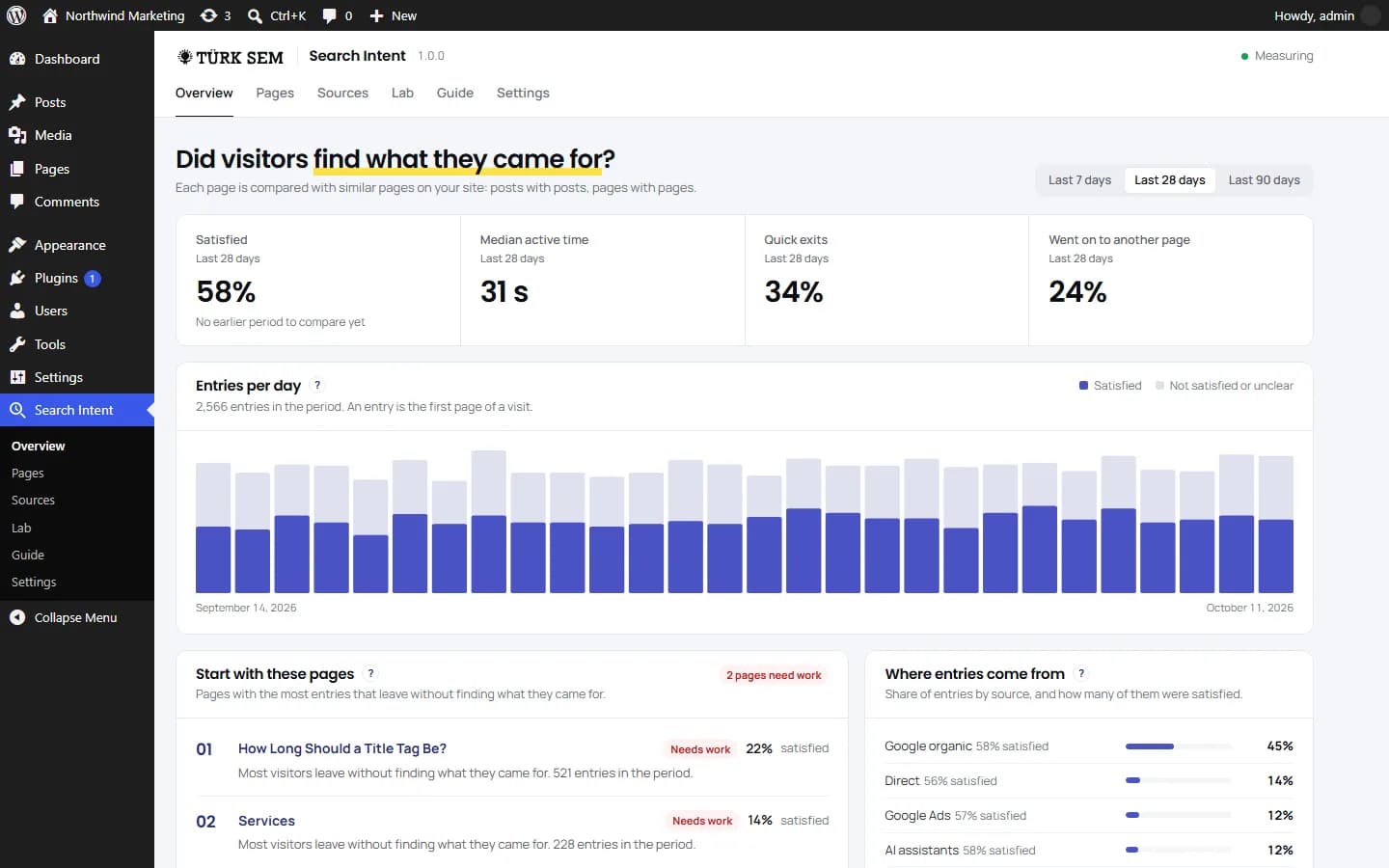
The Search Intent overview inside WordPress: four cards for the last 28 days (satisfaction rate, median active time, quick exits and visits that went on to another page), then entries per day, the pages to start with and where entries come from.
A real screenshot from a WordPress site running the plugin, filled with sample data.
0
cookies set on your visitors
3 KB
tracking script, compressed
30 s
of active time marks a satisfied visit
7
AI providers, with your own key

Four Steps from a Number to a Better Page

A dashboard that calls a page weak and stops there leaves you with the hardest part. Search Intent keeps going. It shows you which page is losing visitors, why, and what to change, and if you agree, it makes the change.

01

Measure

How long each visitor stays active, how far they scroll and what they do next.

02

Compare

Every page against similar pages on your site, with a status and the reason behind it.

03

Diagnose

A freshness check and a scan for broken links and missing pieces, run on your server, then an optional AI review that points to the exact paragraphs.

04

Improve

Every change comes as a before and after. You approve it, and you can undo it.

Step one

When Does a Visit Count as Satisfied?

The first page of a visit is called an entry, and entries matter most here. They show whether the page delivered what the search, the ad or the link promised. A small script in the browser notes how the visit went and sends a small packet when the visitor leaves or clicks a link.

Satisfied
The visitor opened another page, submitted a form, clicked a phone number, email address, WhatsApp link or outside link, or stayed active for at least 30 seconds. Outside links count on purpose: a reader who clicks through to your source has usually found what they needed.
Quick exit
The visitor left within 10 seconds without doing any of that. For visitors from search, this is the clearest sign that the page did not answer the query. A visit of 10 to 30 seconds with no action counts as unclear.
Active time, not open time
The clock starts when the page opens and runs only while the tab is in the foreground. It pauses after 30 seconds without a scroll, mouse move, keystroke or touch. A tab left open in the background adds nothing.
The median, not the average
The median is the middle visit: half were shorter, half longer. A few very long visits pull an average up but barely move the median. Next to it, the plugin shows how far visitors scroll.

Step two

Every Page Against Its Own Kind

Visitors use a contact page differently from a long guide, so a page is never judged against the whole site. Posts are compared with posts, pages with pages, and the home page and archives with their own kind. The pages that lose the most visitors rise to the top.
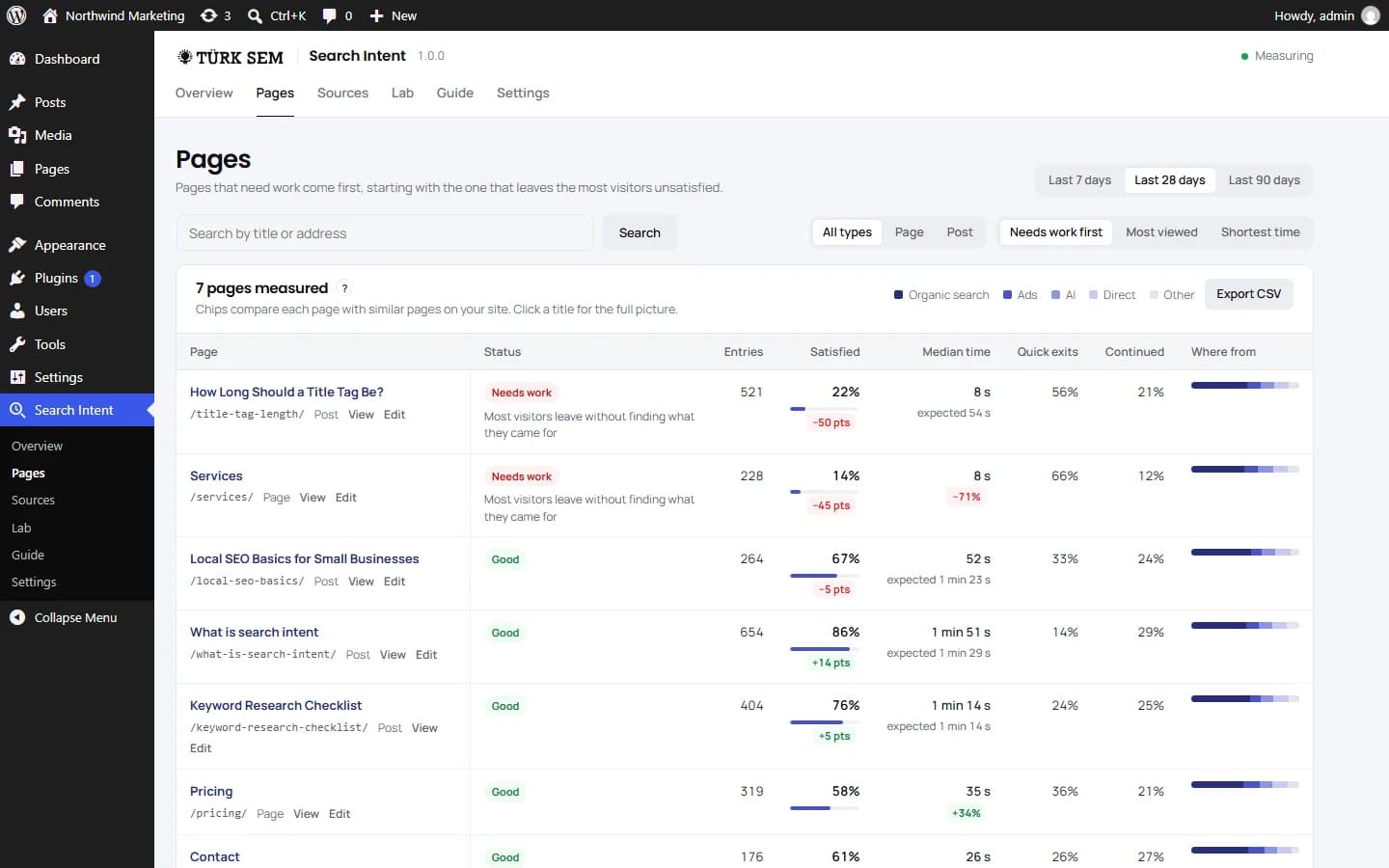
The Pages screen: every measured page with its status, the main reason, entries, the satisfaction rate against similar pages, median time against the expected time, quick exits and a bar showing where its visitors come from.
Green and red chips compare each page with similar pages on the same site. Small gaps get no chip at all.
A status with a reason
Each page is rated Good, Watch, Needs work or Not enough data, with the reasons shown underneath. There are five: far fewer visitors find what they came for than on similar pages; satisfaction is below similar pages; more than 40% of entries leave within 10 seconds; visitors stay far shorter than on similar pages; or they read for less than half the time the post's length calls for. A page gets a rating once it has 30 views in the period.
Expected time for posts
The plugin expects about 25 seconds plus 4.4 seconds for every 100 words. The figures come from reading studies by the Nielsen Norman Group.
Organic and paid, kept apart
Organic search and Google Ads get separate rows. Ad clicks are recognized by the click ID that Google Ads adds when auto-tagging is on. Bing, AI assistants (such as ChatGPT and Perplexity), social media, other sites and direct visits each get their own row as well.
The page that sent them
For visitors from other sites, you see the exact referring page when the browser shares it. The part of an address after the question mark is never stored.
Before and after an update
Once a post's last update is at least a week old, its satisfaction rate for the 28 days before the update sits next to the rate since. It tells you whether the update helped visitors. It says nothing about rankings.
Where you already work
The same status shows up in a column of your Posts and Pages lists, right where you edit content. Click any page to see its findings with what to try, a daily chart with the last update marked, its sources and its referring sites. The page report can be searched and exported as CSV.
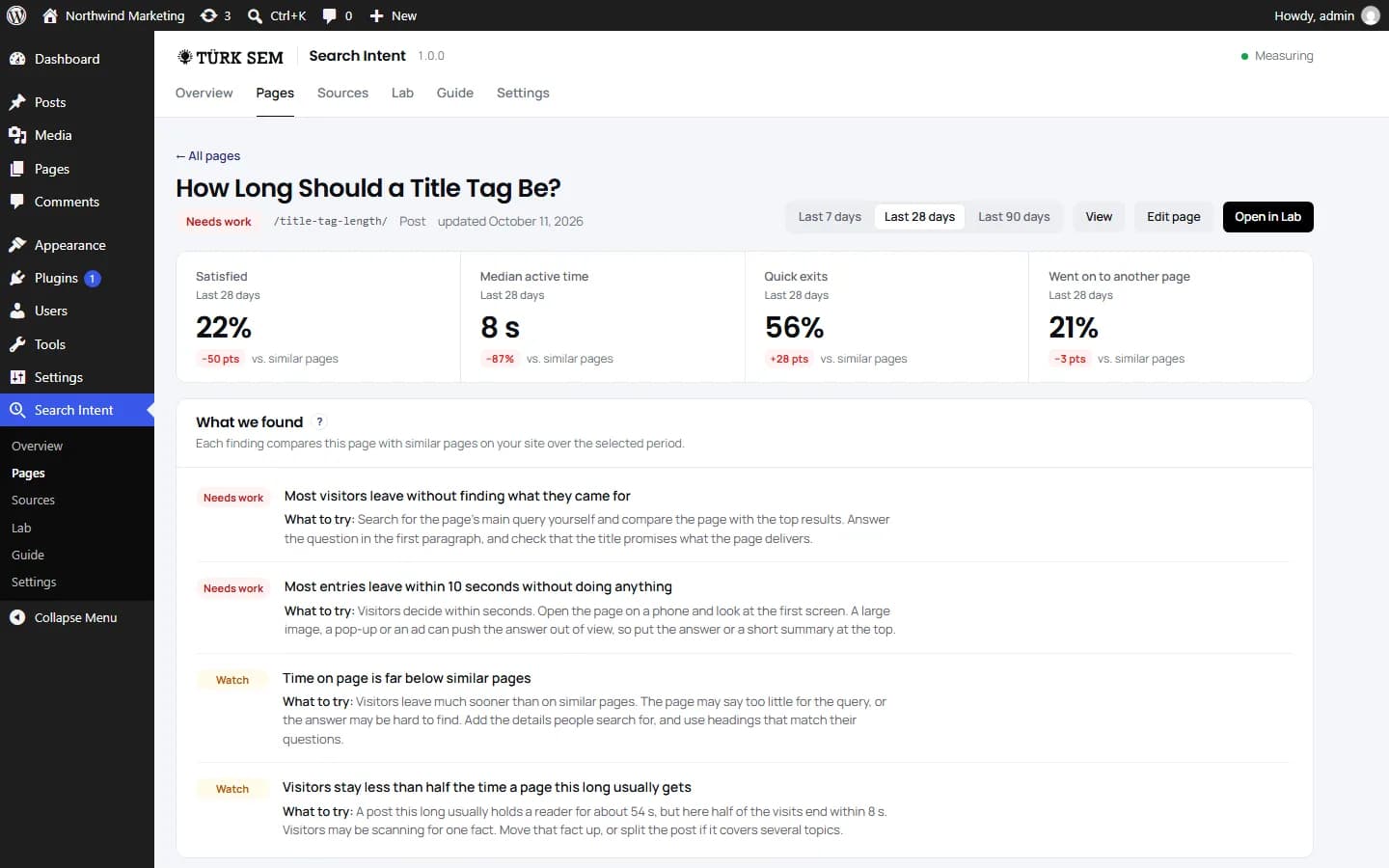
One page in Search Intent: its four numbers against similar pages, then each finding with a suggestion of what to try.
Every finding comes with a concrete next step for that page.

Step three

The Lab Finds What Went Wrong

The Lab works on one post at a time. Its diagnosis runs on your own server, needs no AI and costs nothing. If you want a second opinion, the AI review reads the post together with its measured behavior and tells you what to change first.
Freshness
The Lab checks when the post was last updated and flags wording that makes it look old, such as "in 2023" once that year is over. Older years are usually history and are left alone.
Broken links and missing pieces
Broken and redirected links, domains that no longer respond, images that stopped loading or have no alt text, and a missing meta description in your SEO plugin. Structure counts too: a long post with no subheadings, or paragraphs that run far too long.
Link checks without false alarms
The Lab checks up to 60 links and 40 images per post. Sites that refuse automated requests (401, 403 or 429) are listed as not checkable, never as broken. Addresses on private or local networks are never requested, not even through a redirect.
An AI review with evidence
The AI reads the measured behavior, the diagnosis and the text together. Its advice comes in order of priority, and each item names the paragraph it is about. On a test post, it opened with three facts: 56% of visits were quick exits, similar pages satisfied 72% of their visitors, and the first sentence did not answer the question.
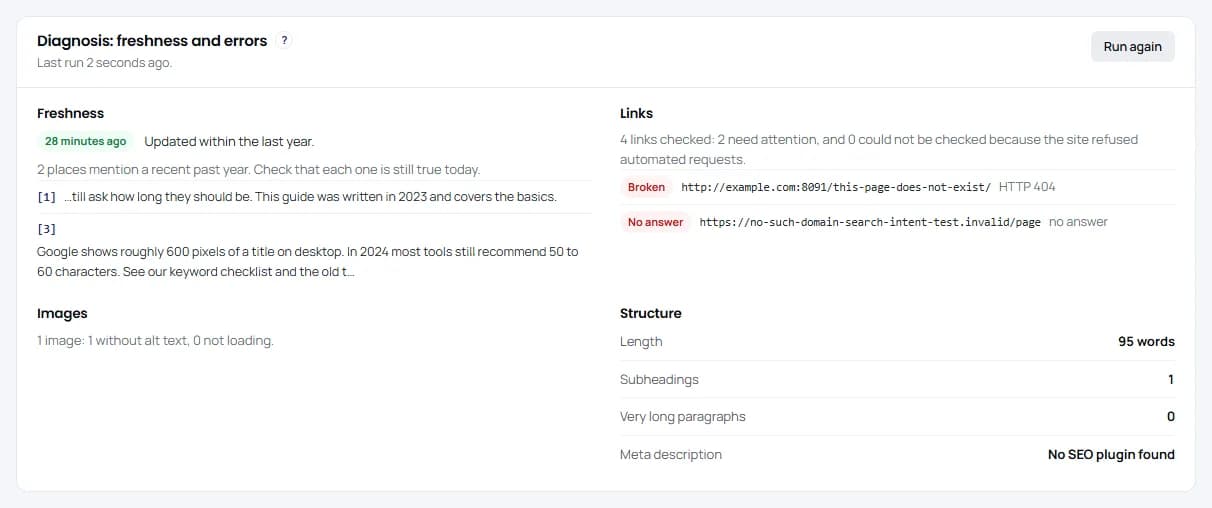
The Lab diagnosis of one post: two dated phrases, one broken internal link, one domain that is gone, an image without alt text, and notes on the structure of the post.
The diagnosis runs on your own server. No AI is involved and it costs nothing.

Step four

Changes You Approve One by One

You choose what should change and see every proposal as a before and after: removed words struck through in red, added words in green. You tick the ones to keep and apply them. When the text or headline changes, WordPress keeps a revision as usual, and you can undo the last change from the Lab's history as long as the post has not been edited since.
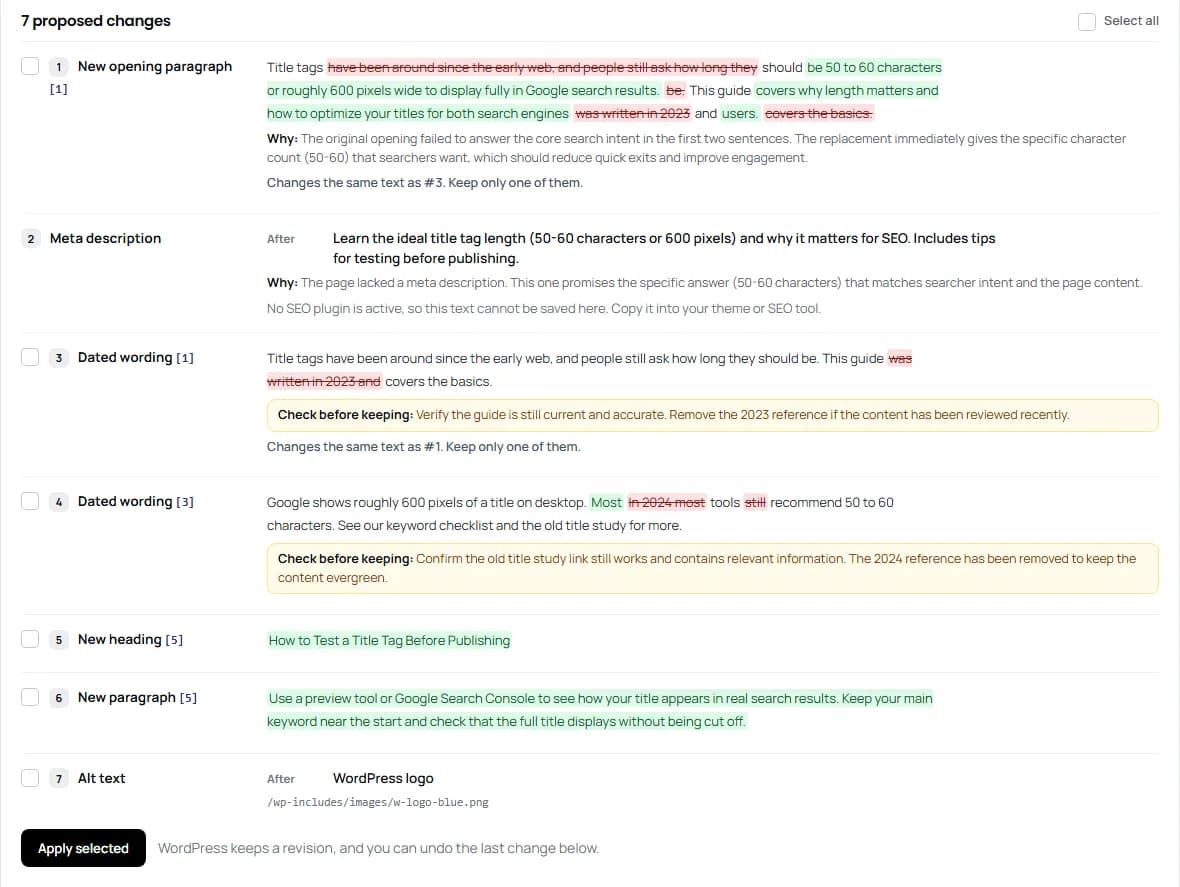
Proposed changes in the Lab: a new opening paragraph marked up word by word, with removed words struck through and added words highlighted, a meta description, dated wording with a note on what to check, a new section and an image alt text.
Nothing is saved until you tick a change and apply it. When two proposals touch the same paragraph, each one flags the other.
Answer first
A new opening paragraph that gives the answer up front, the most direct fix for quick exits.
Title and meta description
A new SEO title, and the visible headline if it needs one, plus a new meta description. They go straight into Yoast SEO, Rank Math or SEOPress. All in One SEO stores them in its own table, so for AIOSEO you get the text to paste in yourself. Search Intent never outputs meta tags of its own.
Dated wording
Sentences that treat a past year as the present. Each proposal comes with a note on what to check before you keep it.
Internal links and alt text
Up to five links to related posts on your site where they help the reader, and descriptions for images that have none.
Broken links, without AI
A redirected link gets its new address. A dead link is removed and its words stay in place.
Your own instructions
A saved prompt or a one-off instruction, such as adding a short section or keeping a friendlier tone.

Guardrails

No wholesale rewrites
The AI never rewrites the post as a whole. It proposes edits to numbered paragraphs, headings and list items, and everything else stays exactly as it was, so the block editor structure stays intact.
No invented links
A new link may point only to an address already in that paragraph or to a related post on your site. If the AI makes one up in new text, the plugin removes the link, keeps the sentence and adds a note. If an edit to an existing paragraph adds an invented link, the whole edit is dropped.
Your newer edits are safe
If the post was edited after the proposals were made, nothing is saved. Just generate the proposals again.
Overlaps are flagged
When two proposals change the same paragraph, each one flags the other, so you don't apply both by accident.

Your AI, Your Key

On WordPress 7.0 and later, the Lab uses the AI provider you set up for the whole site in WordPress, and the plugin stores no key of its own. On older versions, or if you prefer, connect OpenAI, Anthropic Claude, Google Gemini, OpenRouter, Mistral AI, DeepSeek or xAI Grok with your own API key. Either way, usage is billed to your own account and your content goes only to the provider you picked.

A live model list
The list of models loads from the provider itself, so no outdated model name is hard-coded into the plugin. With OpenRouter, one key opens up models from many providers.
Saved prompts
Save your house style or tone as prompts, pick a default and add a one-off instruction to any run.
A monthly cap
You set how many AI runs are allowed each month, which keeps the bill in check. Every run starts with your click, and nothing runs in the background.
The key stays with you
It is stored only on your server and never shown again after you save it. When you delete the plugin, the key goes with it, whatever your data setting.

A Guide Inside the Plugin

A guide screen explains every number and label in plain words, across thirteen topics. The small question mark next to each card title jumps to the topic for that card. Each topic also links to a longer article in English on turksem.com. Those are ordinary links: the plugin itself sends nothing to our site.
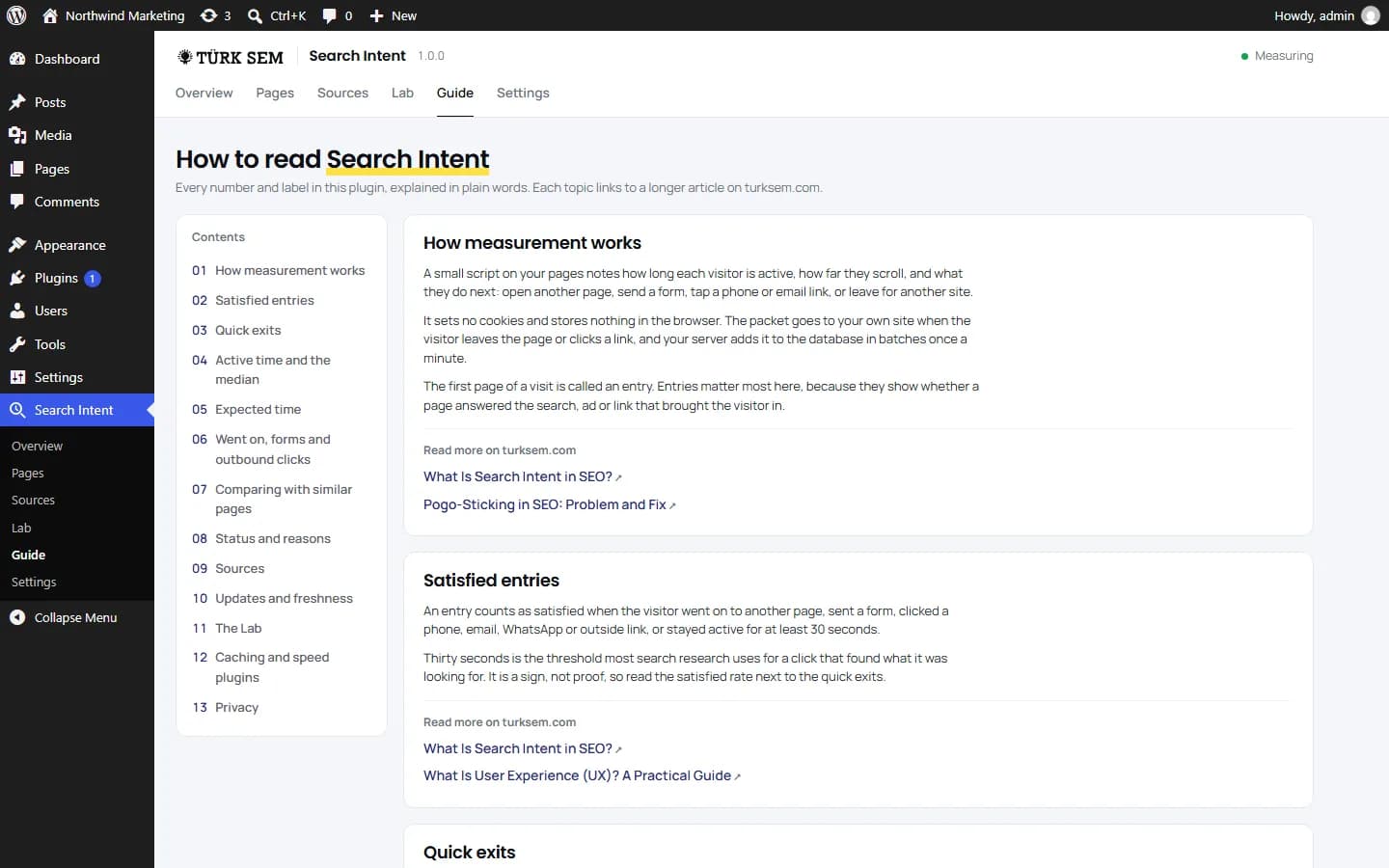
The guide inside the plugin: thirteen topics on the left and plain explanations on the right, each with links to longer articles.
The guide ships with the plugin. Its links open turksem.com in a new tab.

Light, and Safe with Caching Plugins

Measurement should not cost you speed. The script is about 3 KB compressed and loads with defer, so it never holds up the rest of the page. It sends no request while the page loads, only a small packet when the visitor leaves or clicks a link.

Batched writes
Packets go into a buffer file first and reach the database in batches once a minute, so a busy site does not get a database write for every page view. The Overview and Pages reports read daily totals and stay fast as the data grows.
Page caching is safe
The tracker settings are part of the page and hold nothing tied to one visitor, so a cached page is measured just like a fresh one. When you activate the plugin or turn measurement on or off, it also clears the cache of known caching plugins.
Delayed JavaScript is handled
The real risk is the option that holds JavaScript back until the first interaction: a visitor who leaves without touching the page would never be counted. Search Intent automatically excludes itself from the delay, defer, combine and minify settings of these tools: WP Rocket, LiteSpeed Cache, FlyingPress, Perfmatters, Hummingbird, Speed Optimizer, Jetpack Boost, Autoptimize, Breeze, WP-Optimize, WP Fastest Cache, NitroPack and Cloudflare Rocket Loader.
And it notices
If another tool still holds the script back, the plugin notices and shows a warning that spells out the fix.

What It Cannot Tell You

The plugin states these five limits on its own screens too. Anyone reading the numbers should know them.

No pages per session
Without cookies, one visitor's page views cannot be linked into a session. That is the price of storing nothing on their device.
No search queries
It cannot see which query brought a visitor. Google began withholding it in 2011.
Thirty seconds is a sign, not proof
Always read the satisfaction rate together with the quick exits.
Few visits, no verdict
Below 30 views in the period, a page shows Not enough data, because a handful of visits could swing every number.
The AI does not know your facts
It knows only what is on the page, so none of its proposals is saved without your approval.

What Leaves Your Server

Measurement and reports send nothing anywhere, and no account is needed. Nothing ever goes to Türk SEM. Only two Lab features reach outside your server, and only when you click their button. The third request below stays on your own site.

AI review and improvements
Off until you add a key. When you click Review this page or Prepare improvements, the following goes to the provider you chose: the post's text, title and address, the totals measured for that page, the Lab diagnosis and the earlier AI review, your admin language and your prompt. Image file names go along when you ask for alt text, and the titles and addresses of up to 25 related posts when you ask for internal links. Opening Settings refreshes the model list at most once a day; that request carries only your key. Data about individual visits is never sent.
Link check
When you click Run diagnosis, the plugin checks the links and images in that one post. These requests carry no data about your site.
A daily self-test
Once a day the plugin sends a test request to your own site to make sure visitors can reach the address the script sends its data to. It goes nowhere else, carries no data and is not counted as a visit. If a security plugin blocks the REST API for visitors, Search Intent switches to admin-ajax on its own.

Never stored: IP addresses and user agents. For devices, only the type is kept: phone, tablet or desktop. Nothing is written to the visitor's browser, so no cookies, no localStorage and no sessionStorage. For referring sites, only the domain is kept, plus the page path when the browser shares it. The part after the question mark never reaches the database.

Installation

Three steps, and measurement starts on its own. The plugin's interface is in English in this version.

  1. 1Download the package and go to Plugins > Add New Plugin > Upload Plugin. You can also copy the turksem-search-intent folder into wp-content/plugins.
  2. 2Activate it. Measurement starts right away, and the first numbers appear a few minutes after visitors leave their first pages.
  3. 3If you want the AI review and improvements, connect your provider in the plugin's Settings. The diagnosis and the broken link fixes work without a key.

Where This Plugin Comes From

The same measurement runs on turksem.com. We built it for our own site first, to find content that leaves readers unsatisfied and to keep updating it on a schedule. The plugin grew out of that work. We are an agency, not a software company, and the plugin works the way we do: it measures, it explains and it leaves the decision to you.

SEO

SEO starts with search intent, and that is exactly what the plugin checks: whether a page delivers what people searched for.

What is SEO?

GEO

Visitors who arrive from ChatGPT, Perplexity and other assistants get their own row, so you see whether AI traffic finds what it was promised.

What is GEO?

AIO

AIO gets content ready for AI answers, and in the plugin, that is the Lab's job.

What is AIO?

Frequently Asked Questions

Do I need a cookie banner for it?
Search Intent sets no cookies, writes nothing to the visitor's device and stores no IP addresses. Many site owners conclude that it needs no consent, but the rules differ by country and this is not legal advice.
Will it slow my site down?
The script is about 3 KB compressed and loads with defer, so it never holds up the page. It sends nothing while the page loads. On the server, data reaches the database in batches instead of on every view.
Does it work with caching and speed plugins?
Yes. Page caching is safe, and the plugin excludes itself from delayed JavaScript in the common speed plugins. If another tool still holds it back, you get a warning.
How is this different from engagement rate in GA4?
GA4 counts a session as engaged when it lasts longer than 10 seconds, has a key event or has at least two page views, and it needs cookies to do that. Search Intent asks, page by page, whether visitors found what they came for, compares that with similar pages and tells you what to change.
Will the Lab change my posts on its own?
No. Only the proposals you tick are applied. When the text or headline changes, WordPress keeps a revision, and you can undo the last change.
Which AI model should I choose?
A fast, low-cost model is enough for most posts. The model list loads live from your provider, and OpenRouter opens up models from many providers with one key.
Why are my Google Ads visits counted as organic?
When auto-tagging is off in Google Ads, no click ID is added to the landing page address. Without it, an ad click cannot be told apart from an organic one.
What language is the interface in?
English in this version.
What happens to my data when I delete the plugin?
By default, the tables and settings stay, so a reinstall picks up where you left off. Turn off "Keep data when the plugin is deleted" to remove everything. The AI key is deleted in every case.