When we built our first sites in 1999, the whole job was HTML. What we wrote was what appeared. The browser did not step in and interpret anything on its own; the page was simply the page.
Back then on-page SEO had not yet given birth to technical SEO, the two were one thing. We looked at three places: the title, the meta description and the meta keywords. If those three were in order, on-page SEO was practically done.
AltaVista was a powerhouse in those years. The words we typed into the keywords field genuinely moved it. That tag nobody even glances at today sat right at the center of the job.
A great deal has changed since 1999. GEO arrived, Next.js arrived, Chrome took over the browser market. On-page SEO grew out of those three tags into what it is now.
But one thing never changed. Code matters in SEO, technique matters, I have no argument with that. What decides the outcome is the product you put in front of people.
Think of it this way. On YouTube your title works, your description works. So why do people actually watch a video? Not because of the title. Because of the video. SEO is the same. Technical parameters matter, and what matters most is what your site actually solves.
Why On-Page SEO Always Arrives Late
Up to now on-page SEO has been this kind of job. You launch the site. Then you look it over with a few tools. Later, once Search Console has collected data, you interpret that.
Which means we notice what we missed only after we have missed it.
That always felt backwards to me. The cheapest moment to fix a mistake is while nobody has seen it. Spotting it in Search Console a week after launch, fixing it, then waiting for Google to crawl again; that is the most expensive route there is.
The reason is simple. Nearly every audit tool works the same way: you hand over a URL, their server visits it, downloads the page, inspects it. The thing that makes the chain work is also the thing that breaks it. The page has to be reachable from the outside.
So how many unreachable pages are there? More than you would think. The localhost on your own machine, the staging server you use before showing a client, an intranet inside a company network, member pages behind a login, the cart, the checkout step, the draft you have not published. They are all real. They will all face Google one day. And none of them can be looked at today.
We Already Had the Engine
One day it struck us: Türk SEM already runs a thorough SEO analysis engine, and we were only ever pointing it at our own dashboard.
So we said, let us take this on-page analysis core and move it into a Chrome extension. Wherever they are in the world, web developers should see these problems before launch, on their own localhost, in their own browser.
Our engineering team rolled up their sleeves. After months of work the engine now lives inside the extension. The analysis runs entirely in the browser. Your page is uploaded nowhere and not a single request reaches our servers. It could not reach them anyway, because the only thing that can see that page is your own browser.
The practical side is pleasant too. No page limit, no daily quota, no queue. Analyze one page fifty times, it costs nobody anything.
What It Looks At
This is the part we worked on hardest. Tools that produce a checklist already exist; we wanted one that reaches a verdict.
An Indexability Verdict
One sentence on whether Google can put this page in its index. Five signals sit behind it: meta robots, X-Robots-Tag, robots.txt, canonical and hreflang. They are weighed in the order Google actually applies them, and when they contradict each other the contradiction is named.
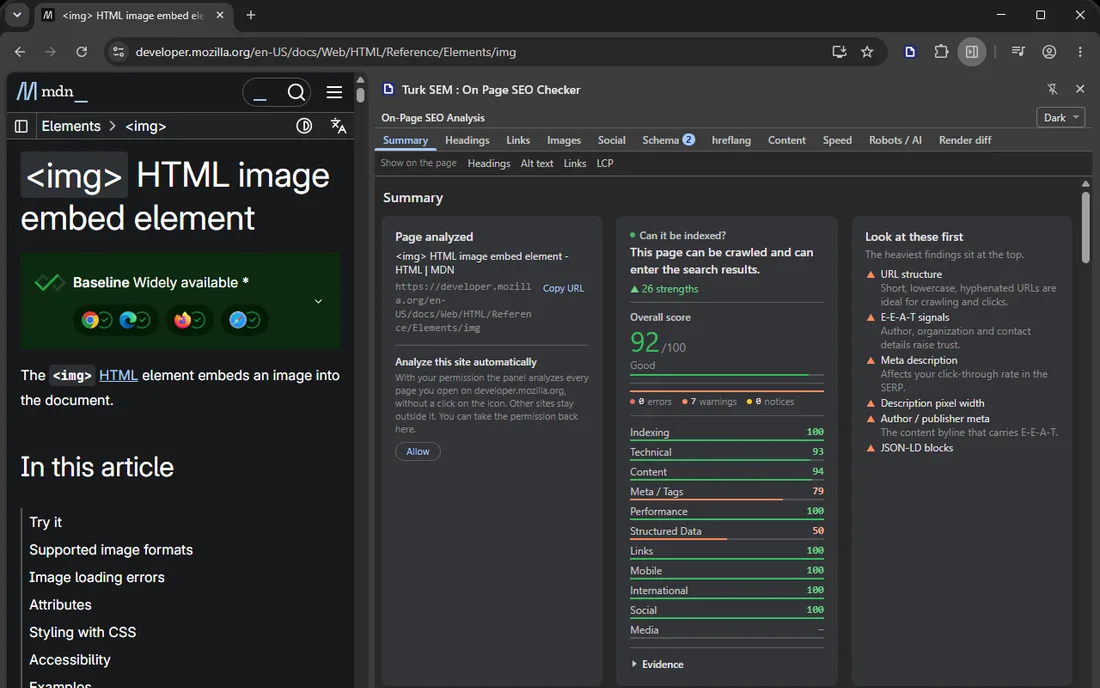
Let me give you an example I like. A noindex tag sits on a path you blocked in robots.txt. Looks sensible, doesn't it, you closed the door twice. But here is the catch: Google never downloads that page, so it never reads the noindex, and the page stays in the index. Two correct things produce a wrong result side by side. That is hard to catch by eye.
The Difference Between Source HTML and the Rendered Page
It puts the server's first response next to the page after JavaScript has run. Title, canonical, meta robots, the H1 sequence and the hreflang set stand in two columns. What JavaScript added, what it changed; you see it.
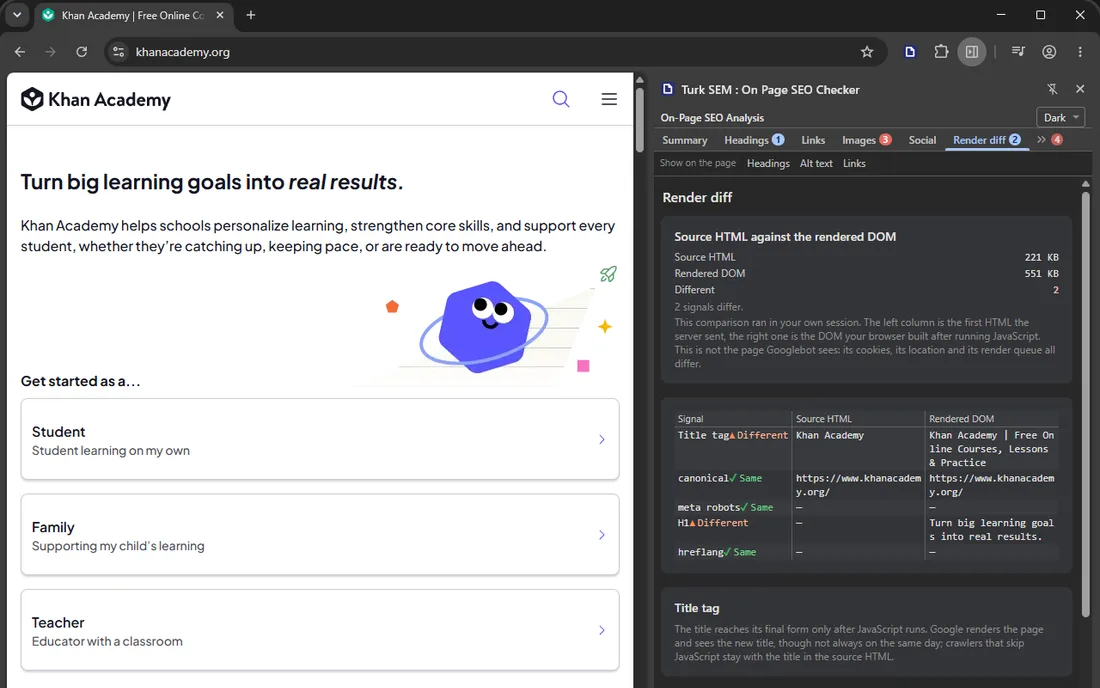
On modern stacks most surprises live in that gap. A title that looks right in the browser can be something else entirely in the source.
Findings Drawn on the Page Itself
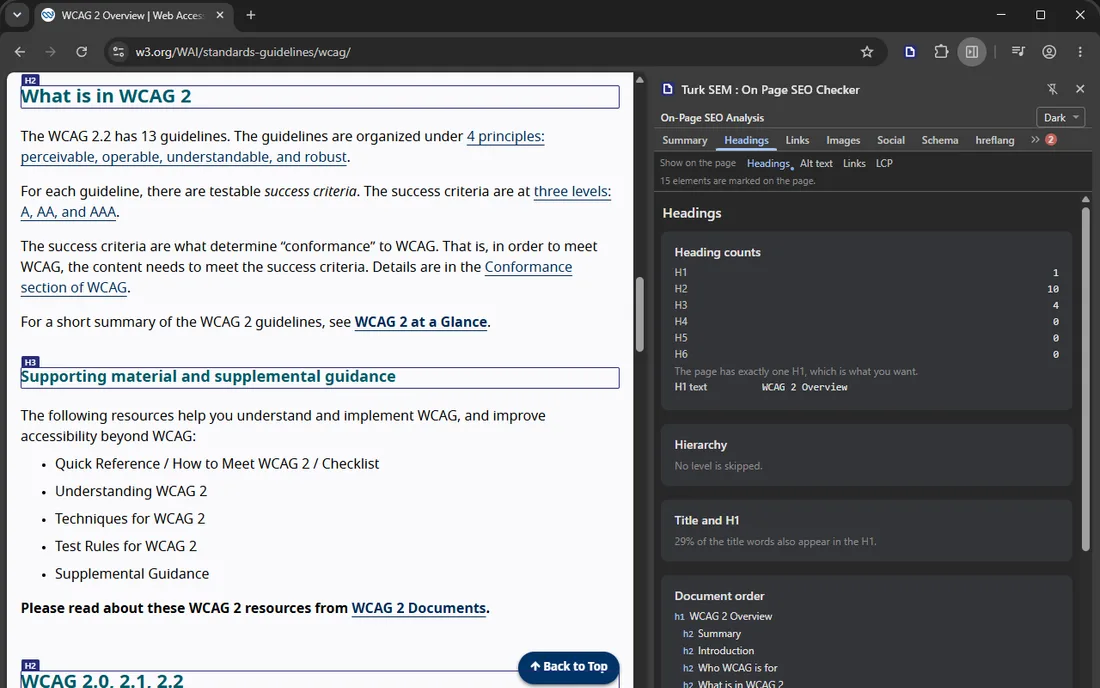
Instead of reading a report you look at the page. It maps the headings, marks images with no alt attribute at all (kept apart from a deliberate alt=""; those two are different things), flags nofollow and sponsored links, picks out vague link text like "click here", and points at the largest content element.
Visibility to AI Crawlers
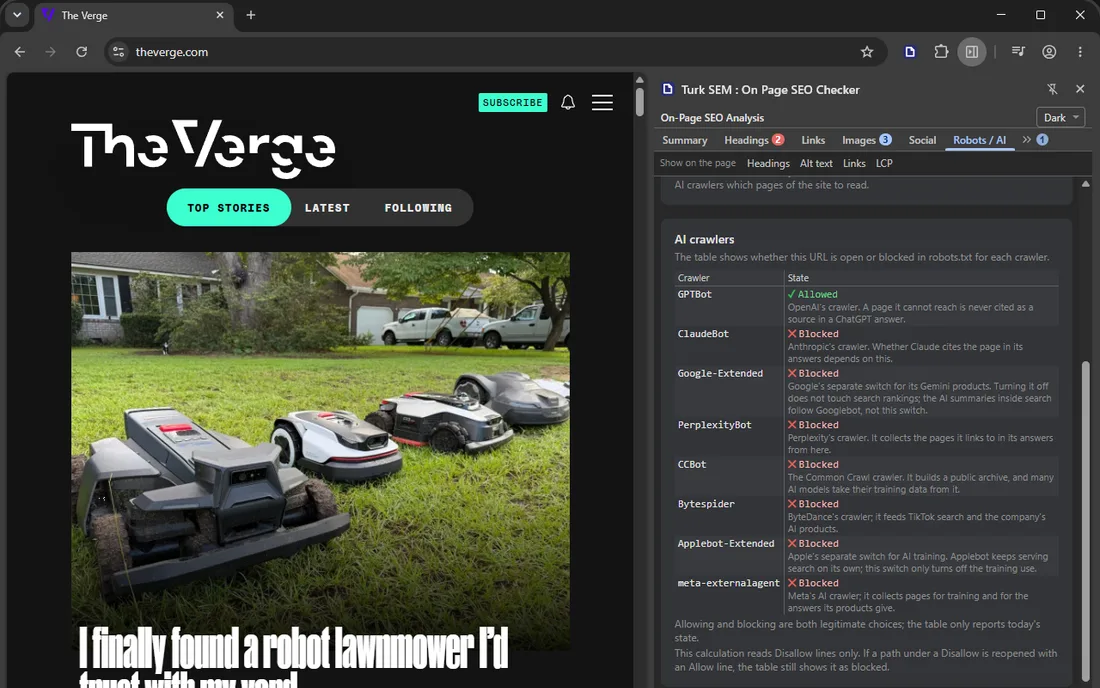
Whether the site has an llms.txt, plus an eight-bot table read from robots.txt: GPTBot, ClaudeBot, Google-Extended, PerplexityBot, CCBot and the rest. Search is no longer only Google. People ask answer engines too, and you need to know whether your site is open to them.
The Classics
Title and description in characters and in pixels. Pixels matter, because Google truncates by pixel width, not by character count. Next to that: a search result preview, the heading tree, internal and external links with their rel distribution, image alt coverage. Open Graph and Twitter Card previews as well. JSON-LD blocks are listed with the rich result each one qualifies for. Finally hreflang tags, word count, readability and keyword density.
Speed, Measured Inside the Tab
LCP, CLS, INP, FCP, TTFB, DOM milestones and transfer sizes. Not a remote server's estimate; a measurement taken where the page actually loaded. The in-tab counterpart of the metrics we cover in our PageSpeed portal.
Handing the Findings to Your AI Assistant
If you code with an AI assistant, this part earns its keep. One button turns the findings into a task document your assistant can act on: what was found, which file to look in, which items are definite faults and which are observations waiting on your judgment.
The document is always in English. That is a deliberate choice rather than a missing translation, because coding assistants follow English instructions more reliably.
What It Does Not Do
I do not trust a pitch that never states its limits either. So let me state ours.
This is a page tool, not a site tool. It looks at the open tab. If you want to crawl a thousand-page site end to end, that is a different job.
It says nothing about rankings. It does not know your position, your competitors or search volume; those need outside data sources, and this extension connects to none. For the same reason it does not show backlinks.
Four requests go to the page's own server: robots.txt, llms.txt, one HEAD and one GET. They go to your site, not to ours.
The Short Version
On-page SEO has been treated as a post-launch job for years. Yet the moment it should actually happen is while the page is still closed to everyone. That gap looked like a real gap to me, so we closed it.
The extension is free on the Chrome Web Store: On Page SEO Checker. Install it, open your localhost:3000, run it. See the state of your page before anyone else does.